Mid Syllabus

Objective Section

Chapter 1, 2 & 7 → 4 MCQs + 4 True/False = 4 Marks

Short Questions

Chapter 5 & 6 → 2 Short Questions = 8 Marks

Long Question

Chapter 1 Or 2 → 1 Long Question = 8 Marks

Case Study Question

Chapter 3 → 1 Case Study Question = 10 Marks

Home

Midterm Practice Guide

Question 1 (10 Marks) — UML from Requirements

Online Library Management System

How to use this guide

  • Read the case study once
  • Follow Part (a) → Part (d) step-by-step
  • Copy the “quick sketches” if time is short
  • Keep diagrams clean, minimal, and consistent

Midterm Question 1 (10 Marks)

Case Study: Online Library Management System

A college library wants to automate its book lending system.

Students can register in the system using their student ID and name. After registration, students can search for books by title or author. Each book has a unique book ID, title, author, and availability status.

If a book is available, a student can borrow it. The system records the borrow date and due date. A student can return a borrowed book. When a book is returned, the system updates its availability.

The librarian can add new books to the system and remove books if necessary.

Tasks (10 Marks)

a) Identify any FIVE main classes from the requirements. (2 marks)

b) Draw a Class Diagram showing: classes, attributes, and relationships. (3 marks)

c) Draw ONE of the following diagrams (choose any one). (3 marks)

  • Use Case diagram for the system OR
  • Activity diagram for the book borrowing process

d) Identify TWO artifacts in this system and briefly explain them. (2 marks)

Part (a): Identify FIVE main classes (2 marks)

The fast hack (what markers want)

Main classes usually come from important nouns that:

  • have their own data (attributes), and
  • participate in multiple actions (verbs), and/or
  • need to be stored/tracked by the system.

You only need any five strong candidates—focus on obvious, high-signal nouns.

Part (a): Steps 1–3

Step 1: Read twice (do not draw yet)

  • First read: understand the story
  • Second read: underline nouns (classes), verbs (methods), data details (attributes)

Step 2: Extract candidate nouns (raw list)

  • Student(s)
  • System / library system
  • Book(s)
  • Librarian
  • Borrow date / due date
  • Availability status
  • Title / author / ID

Step 3: Filter with 3 quick rules

  • Keep entities and records: Student, Librarian, Book, BorrowRecord/Loan
  • Do NOT pick pure attributes: IDs, names, dates, status
  • Do NOT pick verbs: register, search, borrow, return, add, remove

Part (a): Steps 4–6 + model answer

Step 4: Spot the transaction class

“System records borrow date and due date” strongly implies a record entity:

  • BorrowRecord (or Loan / BorrowTransaction)

This class links Student and Book and stores borrow/due dates.

Step 5: Finalize your five classes (write them cleanly)

Model answer (one good set of five):

  • Student — registers, searches, borrows, returns
  • Book — bookId/title/author/status
  • Librarian — adds/removes books
  • BorrowRecord — borrowDate + dueDate, links Student ↔ Book
  • LibrarySystem (or Catalog) — manages search/borrow/return

Step 6: 10-second self-check

  • Do you have at least one role? (Student/Librarian)
  • Do you have the main thing? (Book)
  • Do you have a transaction/record? (BorrowRecord/Loan)

Part (b): Draw the Class Diagram (3 marks)

The fast hack (what markers want)

  • Correct classes
  • Correct attributes (IDs, names, dates, status)
  • Correct relationships + reasonable multiplicities

Do not over-design. Keep it clean and readable.

Time plan

  • 1–2 min: list classes
  • 3–4 min: add attributes
  • 3–4 min: draw relationships + multiplicities
  • 1 min: sanity check

Part (b): Steps 1–2

Step 1: Draw class boxes first

Draw 5 boxes using standard UML class format:

  • Student
  • Book
  • Librarian
  • BorrowRecord (Loan)
  • LibrarySystem (or Catalog)

Exam tip: Ensure all 5 identified classes are present.

Step 2: Add only the given attributes

Student: studentId, name

Book: bookId, title, author, availabilityStatus

BorrowRecord: borrowDate, dueDate

Librarian: librarianId (optional), name (optional)

Rule: Prefer attributes explicitly mentioned.

Part (b): Steps 3–7 (relationships + multiplicities)

Step 3: Convert verbs into relationships (the trick)

  • Student borrows Book → use BorrowRecord to store borrowDate/dueDate
  • Librarian adds/removes books → Librarian manages Book

Step 4: Multiplicities (safe exam choices)

  • Student 10..* BorrowRecord
  • Book 10..* BorrowRecord
  • Librarian 10..* Book
  • LibrarySystem 10..* Student/Book

Tip: Multiplicities must be logical and consistent.

Steps 5–7 (quick)

  • Add simple labels: borrows / for / manages
  • Keep availabilityStatus as Book attribute (simple exam choice)
  • Sanity check: Student + Book + BorrowRecord must exist

How to extract this from the Scenario

Nouns -> Classes: Identify the key entities handling data (Student, Book, Librarian, System).

Verbs -> Relationships: "Student can borrow it" = Relationship between Student and Book.

Hidden Transactions: "The system records the borrow date" indicates a transaction class is needed (BorrowRecord) to hold that specific data.

Clean model sketch

Class Diagram

Click to enlarge

Part (c): Draw ONE behavioral diagram (3 marks)

Choose the easier option for you

  • Option 1: Use Case diagram for the system
  • Option 2: Activity diagram for the borrowing process

Exam hack: pick the diagram type you can finish cleanly in 10 minutes.

Minimum requirement

Include the key decision: Is the book available? and show the system response.

Part (c) — Option 1: Use Case diagram (System Overview)

What markers check

  • Correct Actors (e.g., Student, Librarian)
  • System Boundary box (Online Library Management System)
  • Main Use Cases (actions like Borrow Book, Search Book)
  • Connections between Actors and relevant Use Cases

How to extract this from the Scenario

Look for "Who": The paragraph mentions "Students can register...", "student can borrow...", and "The librarian can add...". These become your Actors.

Look for "What they do": verbs associated with those actors: register, search, borrow, return, add books, remove books. These become your Use Cases.
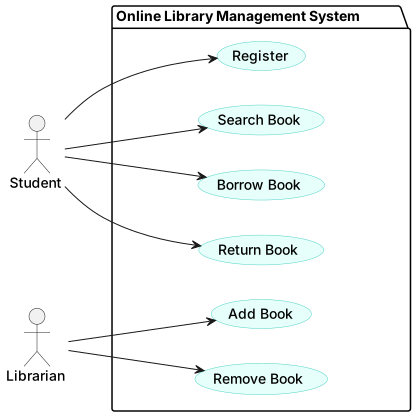
Actors & Use Cases

  • Student: Register, Search Book, Borrow Book, Return Book
  • Librarian: Add Book, Remove Book

Drawing rule

  • Stick figures = Actors
  • Ovals = Use Cases (Actions)
  • Rectangle = System Boundary

Generated Diagram

Use Case Diagram

Click to enlarge

Part (c) — Option 2: Activity diagram (Borrowing Process)

What markers check

  • Clear Start and End
  • One decision: “Book available?”
  • Main steps: request → check → record → update status → confirm/reject

How to extract this from the Scenario

Break down the specific sentence: "If a book is available, a student can borrow it... The system records... When a book is returned, the system updates..."

1. Pre-condition: Student requests a book.

2. Condition/Decision: "If a book is available" -> Creates your diamond decision node.

3. True Branch: "student can borrow it" + "system records borrow date...".

4. False Branch: Implicit in the word "If". If not available, show an error.

Steps in order (list first)

  • Start
  • Search book
  • Request borrow
  • Check availability
  • Decision: available?
  • Yes: create BorrowRecord + update availability + confirm
  • No: show “Not available”
  • End

Drawing rule

  • Rounded rectangles = actions
  • Diamond = decision
  • Label arrows with Yes / No

Copy-friendly sketch

Activity Diagram

Click to enlarge

Final 10-second check

  • Does it include the availability decision?
  • Does it end with a clear system response?
  • Does it reflect the paragraph (borrowDate + dueDate recorded)?

Part (d): Identify TWO artifacts + explanation (2 marks)

What an “artifact” means

An artifact is a physical / deployable implementation piece of the system (something you can install, run, or deploy). Artifacts are not UML classes like Student/Book.

The fast hack

Pick two artifacts that are:

  • obviously required,
  • easy to explain in 2–3 lines,
  • clearly different (app vs database).

Safest pair: Database + Library Management Application

Part (d): Recommended artifacts (exam-ready wording)

Artifact 1: Database (MySQL/PostgreSQL)

  • Stores persistent data: students, books, availability status, borrow records
  • Supports searching, updates, and reporting without losing data

Artifact 2: Library Management Application (Web/Desktop)

  • UI + business logic for register/search/borrow/return
  • Allows librarian to add/remove books and updates data via DB

10-second self-check

  • Did you accidentally write a class instead of an artifact?
  • Did you explain each artifact in ~2 lines?
  • Are the two artifacts different?
Home

Midterm Practice Guide

Question 2 (10 Marks) — UML from Requirements

QR-Based Campus Event Check-in System

How to use this guide

  • Read the case study once
  • Follow Part (a) → Part (d) step-by-step
  • Copy the “quick sketches” if time is short
  • Keep diagrams clean, minimal, and consistent

Midterm Question 2 (10 Marks)

Case Study: QR-Based Campus Event Check-in System

A university wants a simple system to manage entry for campus events (seminars, workshops, sports).

An organizer creates an event with an event ID, title, date/time, and venue. Students register for an event using their student ID and name. After registration, the system generates a unique QR ticket for the student.

On event day, a staff member uses a mobile check-in app to scan a student’s QR ticket at the gate. The system validates the ticket (correct event, not expired, not already used). If valid, the system marks the student as checked-in and records the check-in time. If invalid, the system rejects entry and shows the reason (wrong event, already checked-in, or invalid QR).

The organizer can view a live check-in count and download an attendance list after the event.

Tasks (10 Marks)

a) Identify any FIVE main classes from the requirements. (2 marks)

b) Draw a Class Diagram showing: classes, attributes, and relationships. (3 marks)

c) Draw ONE of the following diagrams (choose any one). (3 marks)

  • Use Case diagram for the system OR
  • Activity diagram for QR check-in process

d) Identify TWO artifacts in this system and briefly explain them. (2 marks)

Part (a): Identify FIVE main classes (2 marks)

The fast hack (what markers want)

Main classes usually come from nouns that:

  • have their own data (attributes)
  • participate in key actions (verbs)
  • must be stored/tracked over time

For full marks include: one role + one core object + one record (transaction).

Part (a): Steps + model answer

Underline nouns, circle verbs

Nouns: Organizer, Event, Student, Ticket, Staff, Check-in time

Verbs: create, register, generate, scan, validate, mark, view, download

Transaction class (easy bonus)

“Records the check-in time” + “not already used” implies:

  • CheckInRecord (EntryLog)

Model set of five classes

  • Student
  • Organizer
  • Event
  • Ticket (QR Ticket)
  • CheckInRecord

Part (b): Class Diagram (3 marks)

The fast hack

  • Correct classes
  • Explicit attributes from the text
  • Correct relationships + reasonable multiplicities

Time plan

  • 2 min: class boxes
  • 4 min: attributes
  • 4 min: relationships + multiplicities

Part (b): Attributes (easy marks)

Event + Student

Event: eventId, title, dateTime, venue

Student: studentId, name

Ticket + CheckInRecord

Ticket: ticketId, qrCodeValue, status

CheckInRecord: checkInTime, result, rejectReason (optional)

Part (b): Relationships + multiplicities

Convert requirements into relationships

  • Organizer creates Event
  • Student registers for Event → Ticket generated
  • CheckInRecord logs a Ticket scan/use

How to extract this from the Scenario

Nouns -> Classes: Entities holding data (Event, Student, Ticket, Organizer).

Verbs -> Relationships: "Organizer creates an event" = Relationship Organizer to Event.

Hidden Transactions: "system records the check-in time" hints a transaction class is heavily needed (CheckInRecord) to log usage.

Clean model sketch

Class Diagram

Click to enlarge

Note: 0..1 check-in record matches “not already used”.

Part (c): Choose ONE behavioral diagram (3 marks)

  • Option 1: Use Case diagram for the system
  • Option 2: Activity diagram for QR check-in process

Minimum: include the validation decision (valid vs invalid) and show system response.

Part (c) — Option 1: Use Case Diagram (System Overview)

Actors & System Boundary

  • Actors: Student, Staff, Organizer
  • System: QR-Based Campus Event Check-in System

How to extract this from the Scenario

Look for "Who": Mentions of "organizer creates", "Students register", and "staff member uses" -> Identify the 3 Actors.

Look for "What they do": match verbs directly to the Actors: register, check-in, create event, view count, download list. These are your Use Cases.
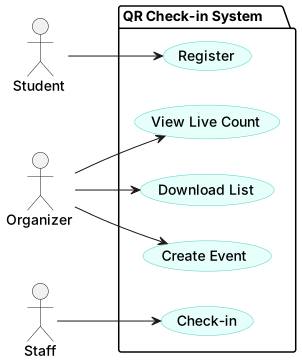
Generated Diagram

Use Case Diagram

Click to enlarge

Part (c) — Option 2: Activity (QR Check-in)

How to extract this from the Scenario

Follow the procedural sentence: "A staff member uses... app to scan a student's QR ticket... The system validates the ticket... If valid, the system marks... If invalid, the system rejects..."

1. Trigger: Staff scans QR.

2. Condition/Decision: "validates the ticket" -> leads to "Is Valid?" diamond.

3. True Branch: "marks the student as checked-in and records...".

4. False Branch: "rejects entry and shows the reason".

Generated Diagram

Activity Diagram

Click to enlarge

Part (d): Identify TWO artifacts (2 marks)

Artifact = deployable implementation piece

Use the deployable test: if you can install/run/deploy it, it’s an artifact.

Safest pair

  • Mobile Check-in Application
  • Database

Part (d): Exam-ready explanations

Mobile Check-in Application

  • Used by staff to scan QR tickets and show accept/reject.
  • Sends scan requests to the backend for validation.

Database

  • Stores events, students, tickets, and check-in records (check-in time).
  • Supports reporting (attendance list download) after the event.