Software Design and Architecture
Instructor: Baber Sheikh (Visiting Faculty)
UML diagrams and code samples use Java. Dotted terms have quick definitions.
In the first 10 weeks you studied architecture, quality attributes, UML modeling, and architectural styles. Now we zoom in — from the big system structure to the small, reusable design solutions inside that structure.
Architecture tells you: "Put 3 bedrooms here, kitchen there, garage on the left."
Design Patterns tell you: "Use this type of door hinge so the door can open both ways."
Both are needed — one is about the whole building, the other is about smart solutions for individual parts.
| Already learned | Why it matters for Week 11 |
|---|---|
| Architecture fundamentals | Patterns are placed inside the components of an architecture |
| Cohesion and coupling | Patterns are practical tools to improve cohesion and reduce coupling |
| Quality attributes | Patterns directly affect maintainability, flexibility, and testability |
| Week | Main topic | Key idea to remember |
|---|---|---|
| Week 1 | Architecture basics | Elements, connectors, constraints, cohesion, coupling, quality attributes |
| Week 2 | Design space | Static, runtime, and management perspectives; connector types |
| Week 3 | Models and views | UML, 4+1 view model, architectural description languages (ADL) |
| Week 4 | Data flow architecture | Batch sequential, pipe-and-filter, process control |
| Week 5 | Data-centered architecture | Repository and blackboard styles, central data, knowledge sources |
| Weeks 6–10 | Midterm + deeper architectural styles | Hierarchy, layered systems, event-driven, microservices |
| Week 11 → | Design Patterns | Reusable solutions at the code design level |
Architecture tells us what parts the system has. Design patterns tell us how to design those parts internally.
Architecture = deciding how many seats, where the engine goes, what type of car (SUV, sedan).
Design Patterns = deciding how the gear mechanism works, how brakes are connected — the internal engineering solutions.
Choose system shape:
Big picture blueprint
Define responsibilities and interfaces:
Component boundaries
Solve recurring local design problems:
← This is Week 11
Patterns do not replace architecture. They work inside architecture. You can't use a design pattern to decide if a system should be layered or event-driven — that's architecture's job.
A design pattern is a reusable, named solution to a commonly recurring problem in software design. It is not finished code — it is a template or idea that you apply to your specific situation.
Think of design patterns like recipes in a cookbook. A recipe gives you the steps and method — but you still choose the ingredients based on what you have. You don't eat a recipe; you use it to make food. Similarly, you don't run a pattern; you use it to design your classes.
In 1994, four computer scientists — Erich Gamma, Richard Helm, Ralph Johnson, and John Vlissides — published a book called "Design Patterns: Elements of Reusable Object-Oriented Software". They are nicknamed the Gang of Four (GoF).
Before GoF, developers solved the same problems over and over, in different ways, with no common names. GoF gave them a shared dictionary. Instead of saying "I'll create a central object that manages all instances," a developer can just say "Singleton" and everyone understands.
Design patterns exist everywhere — not only in software.
A car factory produces cars without the buyer knowing all the internal assembly steps.
→ In code: a factory creates objects without exposing how.
A plug adapter lets a UK appliance work in a US socket without changing either device.
→ In code: an adapter lets two incompatible classes work together.
When you subscribe to a YouTube channel, you get notified when a new video is uploaded.
→ In code: observers are notified when a subject changes.
Pattern names are just agreed labels for solutions we already understand intuitively. Learning patterns means learning to recognize those solutions and apply them deliberately in code.
Every pattern describes a specific recurring problem and provides a well-defined solution structure for it.
Once understood, a pattern can be applied across many different projects and contexts.
Patterns focus on high-level design ideas, not one specific implementation. The same pattern looks slightly different in Java vs Python.
Patterns give developers standard words: Factory, Observer, Singleton. One word replaces a paragraph of explanation.
They come from decades of real-world software development experience — not guesswork.
A pattern is only useful in the right context. Outside its context, it can make things worse.
A map is useful only if you are going to that place. If you hand someone a map of Paris while they are in Tokyo, it's useless — even if the map itself is perfect.
| Common wrong assumption | Correct understanding |
|---|---|
| "Every program must use patterns" | Patterns are tools for recurring design problems. Simple programs may not need them. |
| "Patterns are code to memorize exactly" | Patterns are design ideas. They look different in different languages and contexts. |
| "More patterns = better code" | Wrong patterns or too many patterns create unnecessary complexity — the opposite of the goal. |
| "I need to invent my own solutions" | Patterns save you from reinventing the wheel. If a pattern fits, use it confidently. |
| "Patterns are only for senior developers" | You start learning patterns now because recognizing design problems early is the best habit to build. |
To pick the right pattern: first understand the problem. If the problem is unclear, the pattern selection will also be wrong. Pattern names come after pattern understanding, not before.
The Gang of Four organized all 23 patterns into three groups based on what kind of design problem they solve: Creational, Structural, and Behavioral.
Question: How are objects created?
Focus: object creation and instantiation.
5 patterns total
Question: How are classes and objects composed into larger structures?
Focus: composition and connection.
7 patterns total
Question: How do objects communicate and divide responsibility?
Focus: collaboration and control flow.
11 patterns total
Creational = BIRTH of objects | Structural = SHAPE of objects | Behavioral = TALK between objects
Creational patterns abstract the instantiation process. They make a system more independent of how objects are created, composed, and represented.
If you hard-code new EmailNotifier() in 50 places, switching to SMS later breaks all 50 places. A creational pattern puts that decision in one place.
You have one cookie cutter (the pattern/factory). Each time you press it, a cookie comes out. You don't re-design the cookie shape every time — the cutter takes care of it. Creational patterns are the cookie cutter for your objects.
Structural patterns deal with how classes and objects are assembled to form larger, more useful structures.
You travel from Pakistan (220V) to the USA (110V). Your charger won't fit or work directly. A travel adapter sits in between — it doesn't change your charger or the wall socket, it just makes them compatible.
The Adapter design pattern does exactly this: wraps an incompatible class so it works with your code.
Behavioral patterns focus on communication and responsibility between objects — who does what, and how information flows between them.
When you subscribe to a YouTube channel, you don't keep checking it manually. YouTube notifies you when something new is posted. The Observer pattern works the same way: one object (Subject) notifies all its subscribers (Observers) automatically when its state changes.
| Category | Answers the question | Simple real-world analogy | Example pattern |
|---|---|---|---|
| Creational | How to create objects? | Cookie cutter / Car factory | Factory Method, Singleton |
| Structural | How to assemble objects? | Travel plug adapter / Lego bricks | Adapter, Decorator, Facade |
| Behavioral | How do objects talk to each other? | YouTube subscription / WhatsApp group | Observer, Strategy, Command |
Each pattern solves one type of design problem. If you're confused about which category a pattern belongs to, ask yourself: Is this about creating something, assembling something, or communicating something?
5 Creational + 7 Structural + 11 Behavioral = 23 design patterns total. This week we only study the concepts — specific patterns will be covered in detail in coming weeks.
According to the Gang of Four, every design pattern has a name, a problem it solves, a solution structure, and known consequences (pros/cons).
Imagine a school has one printer. If every student tried to create their own "printer manager" independently, they'd all think they own it and send jobs that conflict.
Singleton ensures: there is only ONE printer manager object in the whole program. Anyone who asks for it gets the same one.
Instead of: PrinterManager pm = new PrinterManager() everywhere in your code (creating many objects) …
Singleton says: PrinterManager pm = PrinterManager.getInstance() — always returns the same one object.
| Advantage | What it means in practice |
|---|---|
| Reusable solutions | Don't solve the same design problem from scratch every time — apply known solutions |
| Shared vocabulary | One developer says "Observer" — the whole team instantly understands the design intent |
| Faster development | Proven templates reduce decision-making time during design |
| Better maintainability | Organized, pattern-based code is easier to change, debug, and extend |
| Scalability | Patterns provide flexible structures that grow with the system's needs |
| Team confidence | Developers can trust a pattern-based design because it has been verified by years of real use |
A pizza chef doesn't invent a new dough recipe every day. They use a proven recipe and tweak toppings as needed. Design patterns are your proven recipe — reliable, repeatable, and improvable.
This is the most common mistake beginners make after learning patterns — they try to "use" a pattern just to show they know it.
Bad habit: "I'll use a Factory here because it sounds smart."
Good habit: "I have a recurring object creation problem — a Factory would solve this cleanly."
Using a pattern incorrectly is like using a screwdriver to hammer a nail. The tool is not wrong — it's the wrong tool for this task. Patterns are only useful when matched to the right problem.
Using the word "Singleton" in an exam without knowing why Singleton exists is not helpful. Always tie the pattern name to the problem it solves.
"Layered architecture" is not a design pattern. Architecture is a system-level decision. Patterns live inside the components of that architecture.
Factory exists in Python, Java, C#, and JavaScript. The idea is the same — only the syntax changes.
Observer is Behavioral (communication). Adapter is Structural (assembly). Singleton is Creational (birth). The category tells you what kind of problem is being solved.
For each scenario below, which category of pattern is probably needed?
First family of GoF patterns — how objects are created, composed, and represented
Creational patterns abstract the instantiation process. They hide how concrete classes are constructed so the rest of the system depends on interfaces and factories, not on new ConcreteType() scattered everywhere. Code samples in this deck use Java. Dotted terms explain jargon.
You have one cutter (the factory). Each press produces a cookie of the right shape. You do not re-design the outline for every cookie — the cutter encapsulates creation.
This section: we cover every creational pattern with simple Java-friendly examples — starting with Factory Method.
Define an interface for creating an object, but let subclasses decide which class to instantiate. Factory Method lets a class defer instantiation to subclasses.
if-else / switch, but that grows into a maintenance trapFactory Method lets you create different objects without coupling callers to every concrete class. You program to the Product interface and the Creator abstraction, not to five “notification” implementations.
You start with email only. Then SMS, push, Slack, WhatsApp… Each channel adds a branch to the same service. The class becomes a control tower that knows every concrete type.

Tight coupling: one service points at every concrete notification class
Adding a sixth channel means editing NotificationService again — regression risk and merge conflicts.
Extract creation into one class. The service asks the factory; it does not build new EmailNotification() itself. Better separation — but the factory still tends toward a switch that grows forever.
class SimpleNotificationFactory {
public static Notification createNotification(String type) {
return switch (type) {
case "EMAIL" -> new EmailNotification();
case "SMS" -> new SMSNotification();
case "PUSH" -> new PushNotification();
default -> throw new IllegalArgumentException("Unknown type");
};
}
}
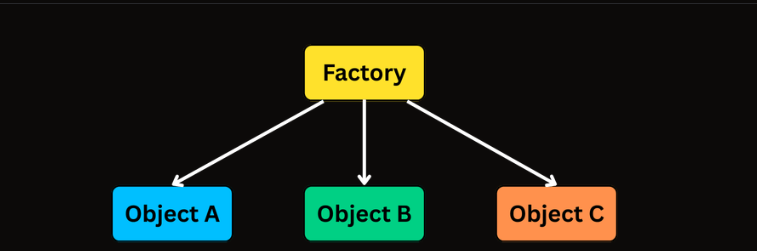
One factory → many product types (still one place to edit)
Each new notification type still means changing the factory’s switch. You are not yet open for extension without modification — you only moved the problem.
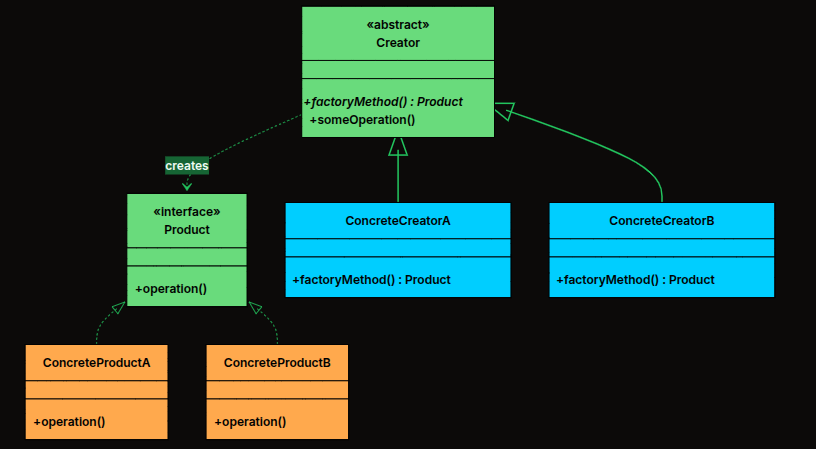
Instead of one central factory deciding everything, the abstract Creator declares createNotification() (or createDocument()); each concrete Creator returns its paired concrete Product. Creation rules live in small classes, not one giant switch.
Simple Factory = one central kitchen that decides pizza vs sushi vs burger.
Factory Method = each restaurant (Pizza Place, Sushi Bar, Burger Joint) has its own kitchen and knows how to prepare its food. The platform routes the order to the right restaurant.
Replace: if type == EMAIL → new Email…
With: EmailNotificationCreator always returns new EmailNotification() — one class, one responsibility, no shared branch.
Classic Factory Method class diagram
Notification) with send()EmailNotification, SMSNotification, …send() calls createNotification() then uses the product)
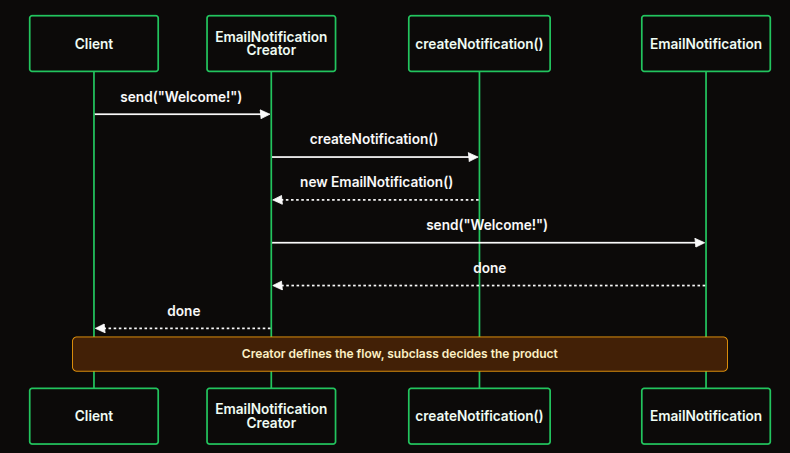
Creator defines the flow; subclass decides the product
send() on the CreatorcreateNotification() — resolved on the concrete subclassNotification (interface type)notification.send(message)interface Notification {
void send(String message);
}
abstract class NotificationCreator {
public abstract Notification createNotification();
public void send(String message) {
Notification notification = createNotification();
notification.send(message);
}
}
The Creator defines how sending works; subclasses only supply which Notification to build.
class EmailNotification implements Notification {
@Override
public void send(String message) {
System.out.println("Sending email: " + message);
}
}
// ... SMSNotification, PushNotification, SlackNotification similarly
class EmailNotificationCreator extends NotificationCreator {
@Override
public Notification createNotification() {
return new EmailNotification();
}
}
// ... one creator per channel
NotificationCreator creator = new EmailNotificationCreator();
creator.send("Welcome to our platform!");
creator = new SMSNotificationCreator();
creator.send("Your OTP is 123456");
Add WhatsApp by introducing two new classes — product + creator — and wiring the new creator where needed. No edits to existing creators or the abstract Creator.
Products: Document (PDF, HTML, CSV). Creators: PdfExportCreator, …
Shared export() in the abstract Creator walks header → rows → footer once; each Document supplies format-specific strings.
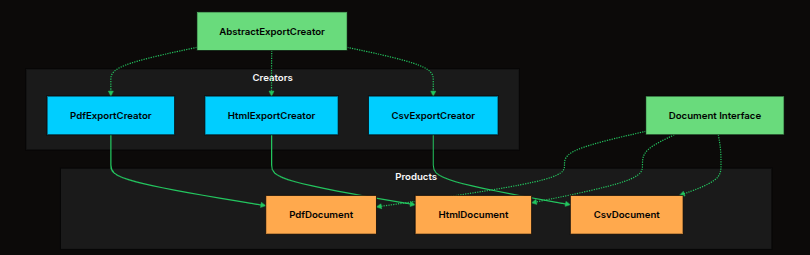
Export system — creators and products paired
abstract class ExportCreator {
public abstract Document createDocument();
public void export(String[][] data) {
Document doc = createDocument();
System.out.println("Exporting to " + doc.getFileExtension() + " format...");
String header = doc.getHeader();
if (!header.isEmpty()) System.out.println(header);
for (String[] row : data) {
System.out.println(doc.formatRow(row));
}
String footer = doc.getFooter();
if (!footer.isEmpty()) System.out.println(footer);
System.out.println("Export complete.\n");
}
}
class PdfExportCreator extends ExportCreator {
@Override
public Document createDocument() { return new PdfDocument(); }
}
OCP: new format = new Document + new ExportCreator. SRP: each document class owns its formatting. Testing: each product in isolation.
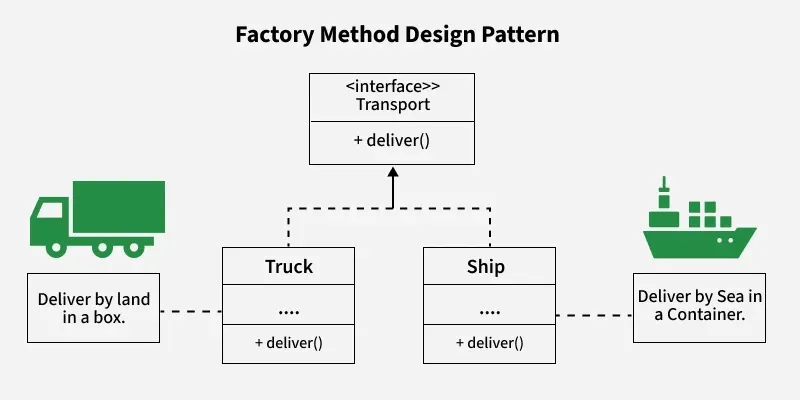
Product family: same deliver(), different vehicles
Without Factory Method, client code might use if (type == 1) new TwoWheeler() else new FourWheeler() — tight coupling and mixed responsibilities.
With VehicleFactory and factories like TwoWheelerFactory / FourWheelerFactory, the client only uses Vehicle v = factory.createVehicle() — the concrete class stays hidden.
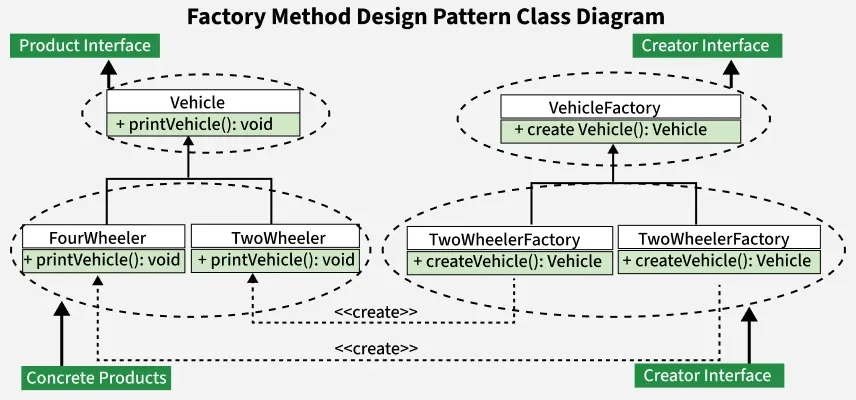
Same structure in Java: interfaces + concrete factories (diagram labels may say C++; logic is identical)
| Feature | Benefit |
|---|---|
| Subclass decides product | No central switch; each pairing is explicit |
| Template method + factory | Shared workflow in Creator; variable product |
Creational pattern — create families of related objects without naming concrete classes
Provide an interface for creating families of related or dependent objects without specifying their concrete classes. Often described as a “factory of factories”: one abstract factory interface, several concrete factories, each producing a consistent set of products.
createA(), createB() — one method per product role in the familyFactory Method — one product type, subclass chooses which concrete product.
Abstract Factory — multiple related product types per family; one factory object builds a matching set.
| Role | Responsibility |
|---|---|
| Abstract Factory | Interface for creating each product in the family (e.g. createCar(), createSpecification()) |
| Concrete Factory | Implements that interface; encapsulates creation rules for one family (e.g. North America vs Europe) |
| Abstract Product | Interface (or abstract class) for each kind of object in the family — clients depend on these types |
| Concrete Product | Family-specific implementations; consistent with siblings from the same concrete factory |
| Client | Uses only abstract factory + abstract products — never names concrete product classes directly |
Creates related objects together; exposes one interface for multiple product kinds; concrete factories pick actual classes at runtime; keeps products within a family consistent.
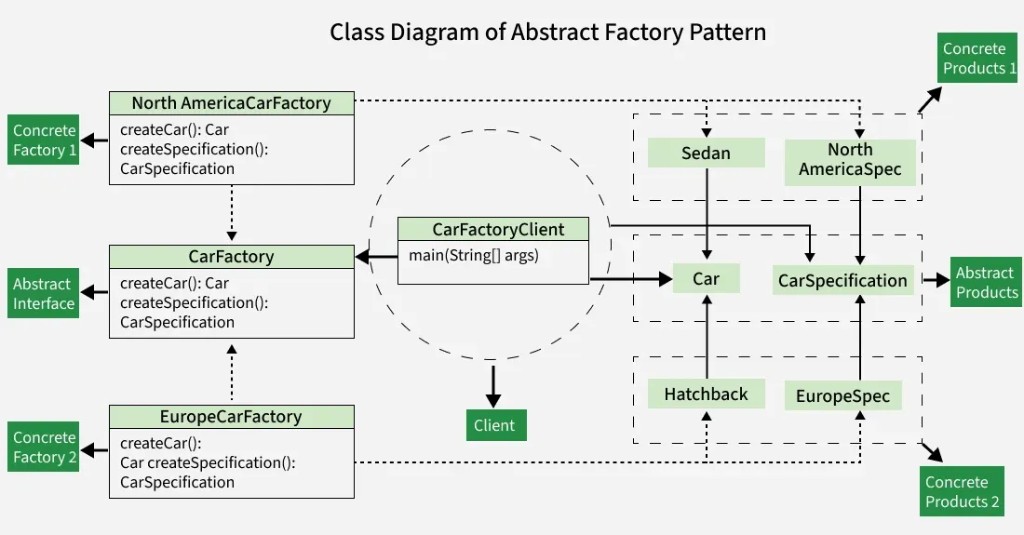
You need cars and specifications for different regions (e.g. North America vs Europe): different regulations, features, and body styles — but within a region, car and spec must stay aligned.
Client depends on CarFactory, Car, and CarSpecification — concrete factories wire each family
Each region needs a matching family of objects. Interfaces keep the client independent of sedan vs hatchback details.
public interface Car {
void assemble();
}
public interface CarSpecification {
void display();
}
public interface CarFactory {
Car createCar();
CarSpecification createSpecification();
}
public class Sedan implements Car {
@Override
public void assemble() {
System.out.println("Assembling Sedan car.");
}
}
public class Hatchback implements Car {
@Override
public void assemble() {
System.out.println("Assembling Hatchback car.");
}
}
// NorthAmericaSpecification / EuropeSpecification implement display()
public class NorthAmericaCarFactory implements CarFactory {
@Override
public Car createCar() {
return new Sedan();
}
@Override
public CarSpecification createSpecification() {
return new NorthAmericaSpecification();
}
}
public class EuropeCarFactory implements CarFactory {
@Override
public Car createCar() {
return new Hatchback();
}
@Override
public CarSpecification createSpecification() {
return new EuropeSpecification();
}
}
CarFactory northAmericaFactory = new NorthAmericaCarFactory();
Car northAmericaCar = northAmericaFactory.createCar();
CarSpecification northAmericaSpec = northAmericaFactory.createSpecification();
northAmericaCar.assemble();
northAmericaSpec.display();
CarFactory europeFactory = new EuropeCarFactory();
Car europeCar = europeFactory.createCar();
CarSpecification europeSpec = europeFactory.createSpecification();
europeCar.assemble();
europeSpec.display();
Assembling Sedan car. plus the North America spec line; then Assembling Hatchback car. plus the Europe spec line.
Modern vs Victorian — each theme needs a matching chair and table. The client uses FurnitureFactory, Chair, and Table only; ModernFurnitureFactory returns ModernChair + ModernTable, and similarly for Victorian.
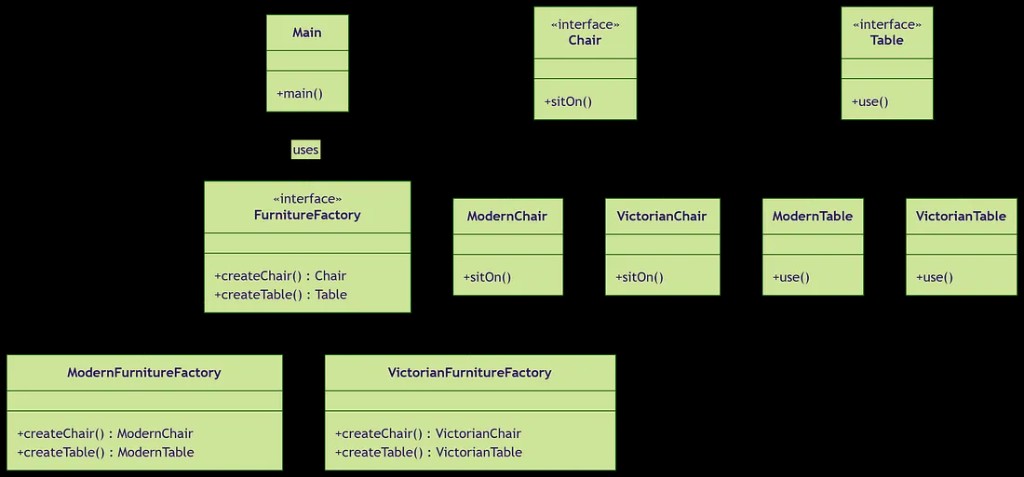
Same structure: abstract factory + two product interfaces + concrete families
public interface FurnitureFactory {
Chair createChair();
Table createTable();
}
public interface Chair { void sitOn(); }
public interface Table { void use(); }
public class ModernFurnitureFactory implements FurnitureFactory {
public Chair createChair() { return new ModernChair(); }
public Table createTable() { return new ModernTable(); }
}
FurnitureFactory factory = new ModernFurnitureFactory();
Chair chair = factory.createChair();
Table table = factory.createTable();
chair.sitOn();
table.use();
Victorian factory returns VictorianChair / VictorianTable — client code stays identical except the chosen factory instance.
Very small apps; no real “families”; or when the extra interfaces/classes are not worth the indirection.
new callsCreational pattern — build complex objects step-by-step, separating construction from the final representation
Construct objects with many optional parts incrementally. A dedicated Builder owns assembly; the Product can stay immutable and validated after build().
Instead of one giant constructor, clients configure a builder with named methods, then call build(). Same construction process can yield different configurations.
HttpRequestFields: URL (required), method, headers, query params, body, timeout — many optional. The naive approach is constructor overloading (telescoping): each new optional adds another constructor or more parameters.
String / Map params; easy to swap positionsnull for “unused” slotsnew HttpRequestTelescoping(url);
new HttpRequestTelescoping(url, method, null, null, body);
new HttpRequestTelescoping(url, method, headers, null, body, timeout);
this so calls chain: builder.a().b().build()Participants: Builder (steps + build()), ConcreteBuilder (often fluent inner class), Product (complex result), Director (optional — orchestrates step order).
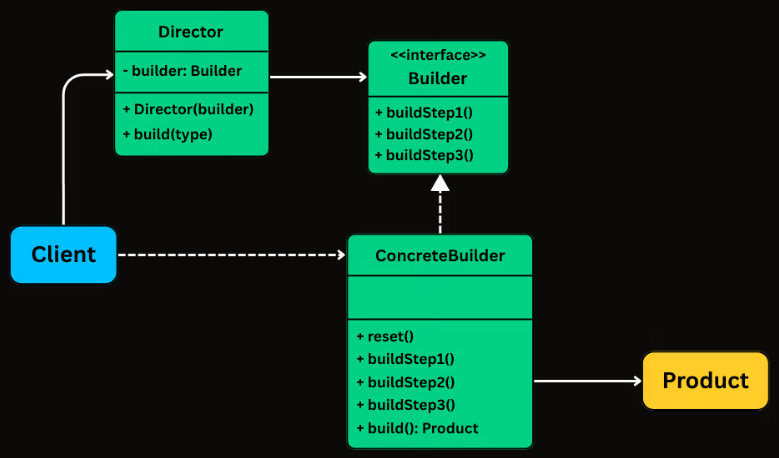
Classic Builder structure (Director optional for fluent APIs)
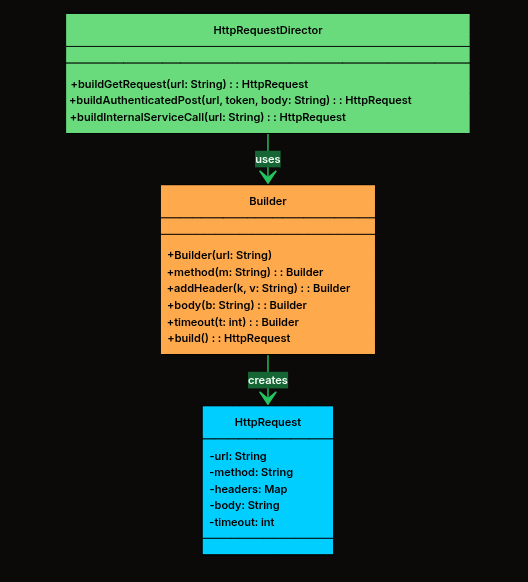
Director encodes recipes; fluent Builder sets method, headers, body, timeout; build() yields HttpRequest
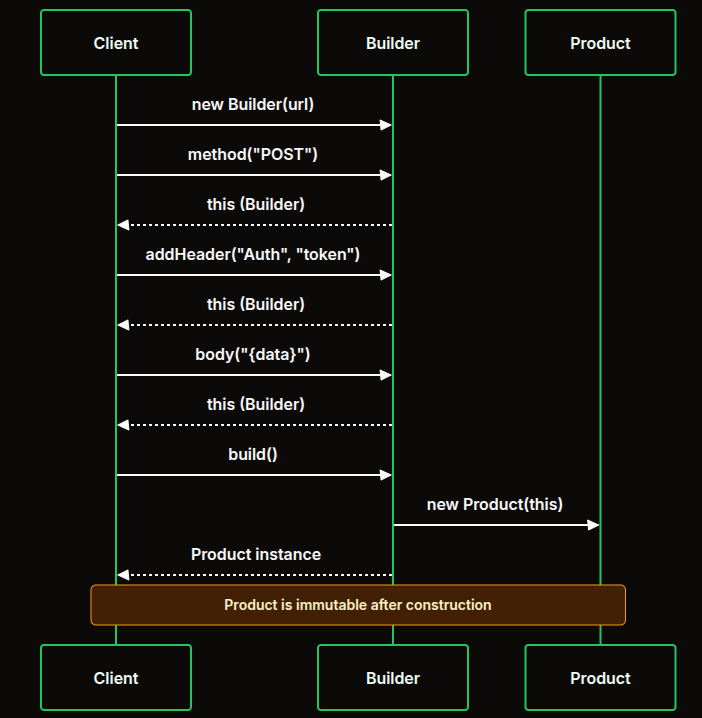
Chaining returns this; build() constructs the product — often immutable after that
build() — validate, construct product (private constructor + builder state)HttpRequest + nested Builderpublic class HttpRequest {
private final String url;
private final String method;
private final Map<String, String> headers;
private final Map<String, String> queryParams;
private final String body;
private final int timeout;
private HttpRequest(Builder builder) {
this.url = builder.url;
this.method = builder.method;
this.headers = Collections.unmodifiableMap(new HashMap<>(builder.headers));
this.queryParams = Collections.unmodifiableMap(new HashMap<>(builder.queryParams));
this.body = builder.body;
this.timeout = builder.timeout;
}
public static class Builder {
private final String url;
private String method = "GET";
private Map<String, String> headers = new HashMap<>();
private Map<String, String> queryParams = new HashMap<>();
private String body;
private int timeout = 30000;
public Builder(String url) { this.url = url; }
public Builder method(String method) { this.method = method; return this; }
public Builder addHeader(String k, String v) { headers.put(k, v); return this; }
public Builder body(String body) { this.body = body; return this; }
public Builder timeout(int t) { this.timeout = t; return this; }
public HttpRequest build() { return new HttpRequest(this); }
}
}
HttpRequest get = new HttpRequest.Builder("https://api.example.com/users").build();
HttpRequest post = new HttpRequest.Builder("https://api.example.com/users")
.method("POST")
.addHeader("Content-Type", "application/json")
.body("{\"name\":\"Alice\"}")
.timeout(5000)
.build();
null arguments — each field is explicitbuild()Every line names an aspect of the request. Mistakes are easier to spot than in a long constructor argument list.
When many call sites need the same builder steps (auth header, JSON content-type, timeout), duplicate chains become maintenance risk. A Director wraps those sequences in named methods.
class HttpRequestDirector {
public HttpRequest buildSimpleGet(String url) {
return new HttpRequest.Builder(url).method("GET").timeout(30000).build();
}
public HttpRequest buildAuthenticatedPost(String url, String token, String body) {
return new HttpRequest.Builder(url).method("POST")
.addHeader("Authorization", "Bearer " + token)
.addHeader("Content-Type", "application/json")
.body(body).timeout(10000).build();
}
}
| Approach | When |
|---|---|
| Client uses Builder directly | One-off configs; each site differs |
| Director | Same preset in many places; named standard requests |
Rule of thumb: if you copy-paste the same chain three times, consider a Director.
QueryBuilderORMs and DB APIs often use Builder to assemble SELECT … WHERE … ORDER BY … LIMIT without string concatenation bugs. Each method adds a clause; build() returns a query object or SQL string.
SqlQuery q = new SqlQuery.Builder("users")
.select("name", "email")
.where("age > 18")
.where("active = true")
.orderBy("name", "ASC")
.limit(10)
.build();
// query2: orders table, filters, ORDER BY created_at DESC, LIMIT 20 OFFSET 40
Natural DSL shape: each call adds structure; invalid combinations can be caught in build().
build()Creational pattern — create new objects by cloning an existing instance instead of coupling to concrete constructors everywhere
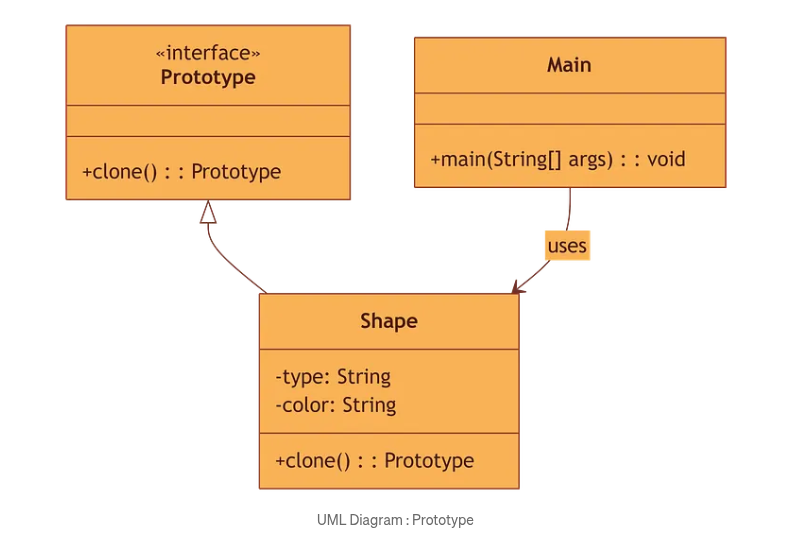
Specify the kinds of objects to create using a prototypical instance, and create new objects by copying that prototype. Useful when instantiation is expensive or many objects share similar initial state.
Clone a template object that already holds the right state. Adjust the copy if needed. The original stays untouched unless you intend to change it.
clone() (or copy operation)
Prototype interface, concrete Shape, client Main
Shapepublic interface Prototype {
Prototype clone();
}
public class Shape implements Prototype {
private String type;
private String color;
public Shape(String type, String color) {
this.type = type;
this.color = color;
}
public void setColor(String color) { this.color = color; }
@Override
public Prototype clone() {
return new Shape(this.type, this.color);
}
@Override
public String toString() {
return "Shape [Type = " + type + ", Color = " + color + "]";
}
}
Shape originalShape = new Shape("Circle", "Red");
Shape clonedShape = (Shape) originalShape.clone();
clonedShape.setColor("Blue");
// original stays Red; clone is independent
Original Shape : Shape [Type = Circle, Color = Red] — after changing clone color, original remains Red.
Dough = prototype object with a known state. Cutter = clone() — each cookie matches the shape; you can decorate each copy without changing the template.
Same idea: duplicate structure fast, then specialize copies.
Prototype, not specific concrete classesObject.clone() is protected and awkward; custom interfaces are clearer)Creational pattern — ensure a class has only one instance and provide a global access point
Use when you need centralized control of a resource: configuration, logging, database connection pool handle, print spooler, etc. — one shared object, consistent state, controlled lifecycle.
Overuse → hidden dependencies, harder unit tests, global state. Prefer dependency injection where you can pass the instance explicitly.
getInstance()Consider subclassing only when the design truly needs a replaceable singleton implementation — most teams prefer composition over singleton inheritance.
new from outsidegetInstance() creates (once) or returns existing
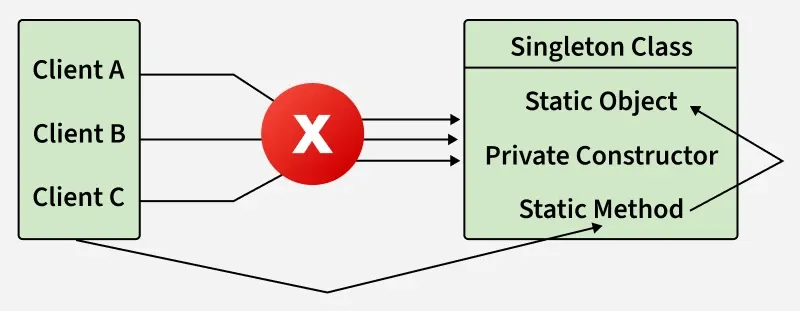
No direct construction — access through the static gateway
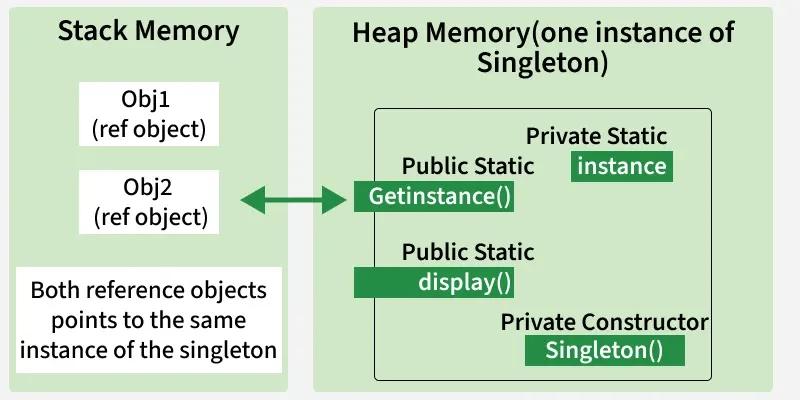
Multiple references, one heap object
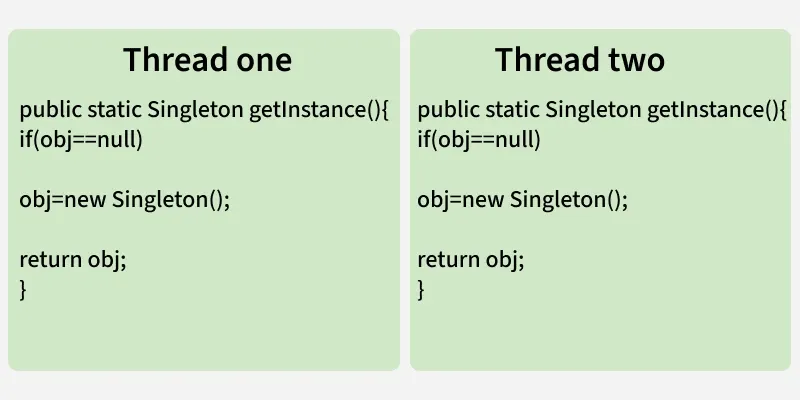
Classic lazy if (obj == null) — not safe under concurrency
volatile)Lazy creation: simple for learning; add synchronization for real multi-threaded apps.

public class Singleton {
private static Singleton instance;
private Singleton() {
System.out.println("Singleton is instantiated.");
}
public static Singleton getInstance() {
if (instance == null) {
instance = new Singleton();
}
return instance;
}
public void doSomething() {
System.out.println("Something is done.");
}
public static void main(String[] args) {
Singleton.getInstance().doSomething();
}
}
Console: “instantiated” prints once; later getInstance() returns the same object (single-threaded scenario).
new| Pattern | Core idea | Typical use |
|---|---|---|
| Factory Method | Subclass chooses which product to instantiate | One product family; variation by subclass |
| Abstract Factory | Factory interface builds a family of related objects | Themes, platforms, regional stacks |
| Builder | Step-by-step assembly; fluent build() |
Many optional parameters; immutable products |
| Prototype | Clone an existing object as template | Costly construction; similar starting state |
| Singleton | One instance + global access | Config, logging, shared resource gateways |
Five GoF creational patterns: how objects are created and wired — from factories and builders to cloning and a single shared instance. Each solves a different tension: flexibility, families, stepwise construction, duplication, or uniqueness.
Next we move from birth to structure: how objects are composed and extended without rewriting cores — the Structural patterns.
Focus: how classes and objects are composed to form larger structures — flexibility, reuse, and clean interfaces
| Pattern | Topic focus |
|---|---|
| Adapter | Example · Applicability · Pros & Cons — make incompatible interfaces work together |
| Bridge | Example · Applicability · Pros & Cons — separate abstraction from implementation |
| Decorator | Example · Applicability · Pros & Cons — add responsibilities dynamically |
| Composite | Example · Applicability · Pros & Cons — tree structures, part–whole hierarchies |
For each pattern: intent, structure, a concrete example, when to apply, and trade-offs — same rhythm as creational patterns.