Software Design and Architecture
Instructor: Baber Sheikh (Visiting Faculty)
A design pattern is a proven, reusable solution to a recurring design problem. It is not ready-made code; it is a smart template of thinking.
Think of patterns like standard engineering tricks. A civil engineer does not reinvent bridges every time. They reuse proven designs and adapt them for the new context.
Pattern = idea. Code = implementation. Same pattern can be written in any language. The syntax changes, but the design idea stays the same.
The Gang of Four (GoF) grouped 23 famous patterns into three families. This family tells you what kind of problem the pattern solves.
| Category | Main Question | Simple meaning | Examples |
|---|---|---|---|
| Creational | How should objects be created? | Object birth | Factory Method, Builder, Singleton |
| Structural | How should objects/classes be connected? | Object assembly | Adapter, Bridge, Decorator, Composite |
| Behavioral | How should objects communicate? | Object interaction | Observer, Strategy, Command |
We spent the whole week on Creational patterns because before objects can collaborate, we must understand how to create them correctly.
Now we move to Structural patterns: once objects exist, how do we combine them in a clean and flexible way?
Create one product through a common creator interface, but let subclasses choose the concrete class.
if-else or switch chains
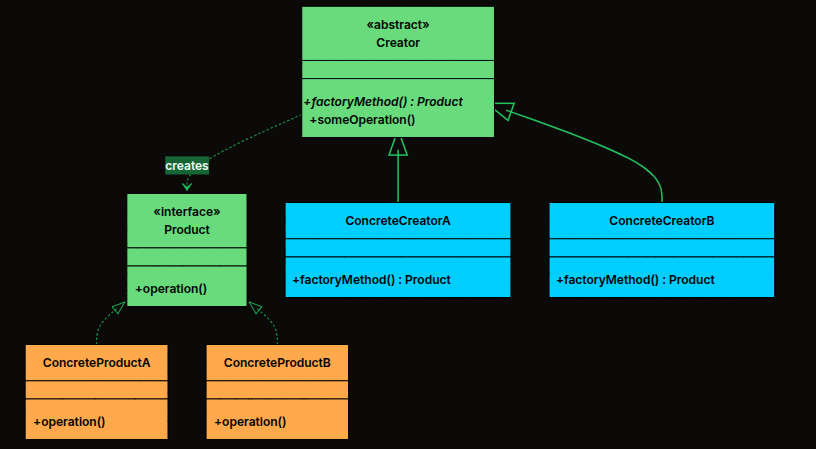
One creator hierarchy decides which product object to create
A NotificationCreator defines the workflow, while EmailNotificationCreator or SMSNotificationCreator decides what object is actually created.
Create families of related objects together, so the client gets a full matching set instead of just one product.
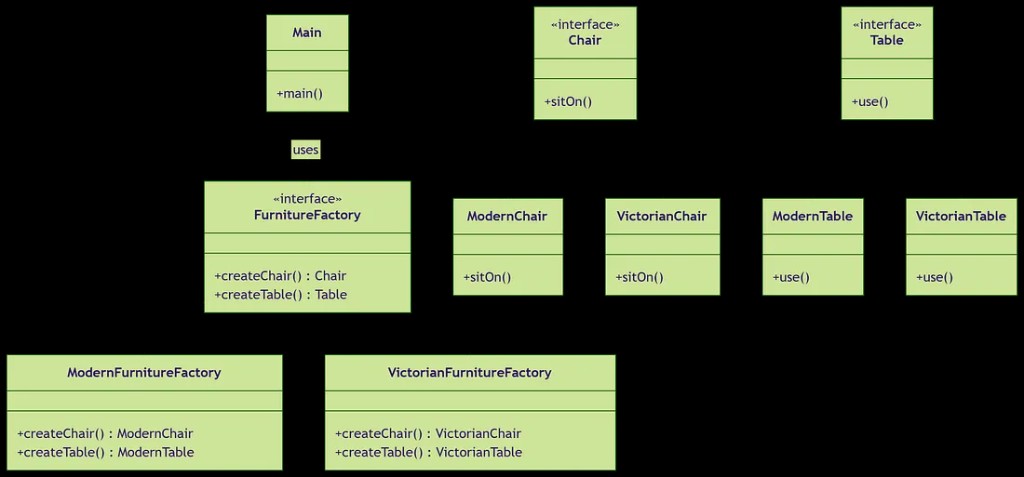
One factory creates a matching chair + table family
If the customer picks Modern, they should get a ModernChair and a ModernTable, not a modern chair with a Victorian table.
Construct a complex object step by step so code becomes readable, flexible, and less error-prone.
null values or parameters in the wrong order
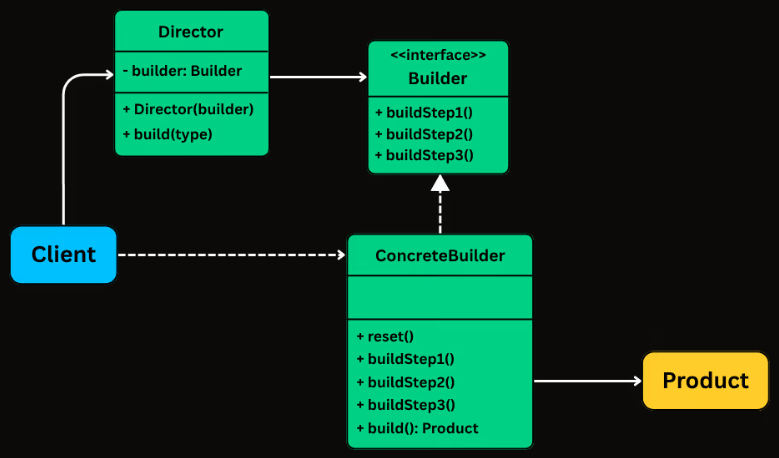
Builder stores construction steps and returns the final product only at the end
HttpRequest.Builder let us set URL, method, headers, body, and timeout one by one, then call build() at the end.
Create a new object by copying an existing one instead of rebuilding everything from scratch.
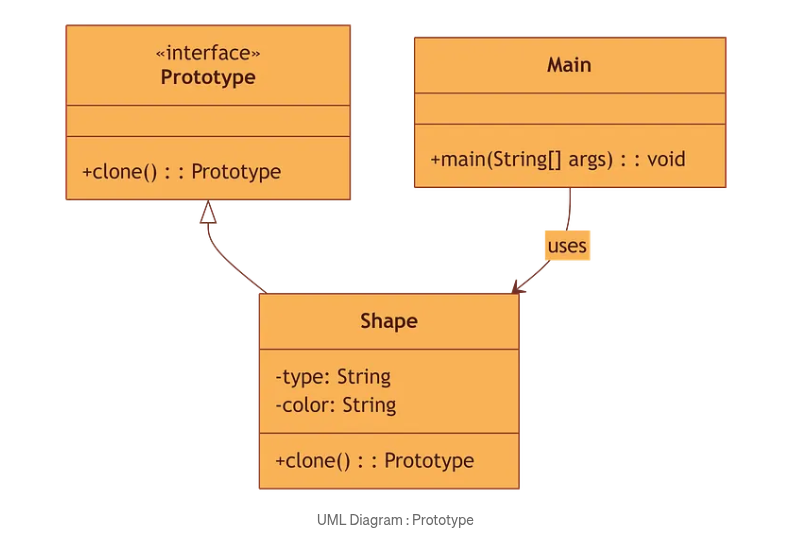
The client clones a prototype instead of constructing another full object
Example: clone a red circle, then change only the color to blue.
Ensure there is only one instance of a class and provide a single place to access it.
Important: use it carefully because global state can make testing difficult.
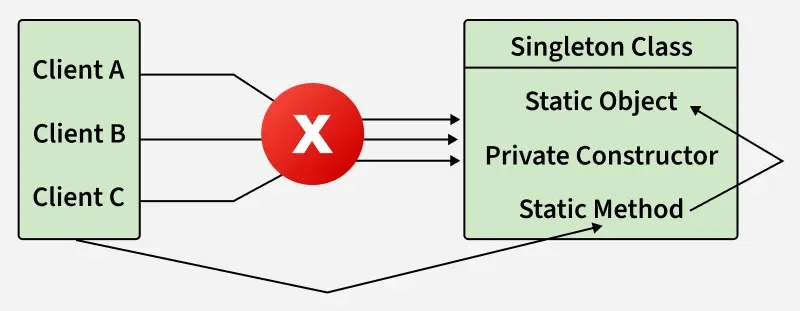
Clients do not create new objects directly; they all use the same shared instance
Singleton is useful for true shared control, but it should not become an excuse to make everything global.
| Pattern | Main question it answers | Best mental model | Typical example |
|---|---|---|---|
| Factory Method | Which concrete class should I create? | Subclass chooses the product | Email vs SMS notification creator |
| Abstract Factory | How do I create a matching family of products? | One factory, many related products | Modern vs Victorian furniture |
| Builder | How do I build one complex object cleanly? | Step-by-step assembly | HttpRequest or SQL query builder |
| Prototype | How do I get another object like this one? | Clone an existing template | Copy a shape, then modify one property |
| Singleton | How do I guarantee only one instance exists? | Single shared access point | Logger or configuration manager |
Factory chooses, Abstract Factory groups, Builder assembles, Prototype copies, Singleton restricts.
Structural design patterns focus on class and object composition. They help us connect small pieces of code to form larger, cleaner, and more flexible structures. The GoF catalogued 7 structural patterns in their 1994 book.
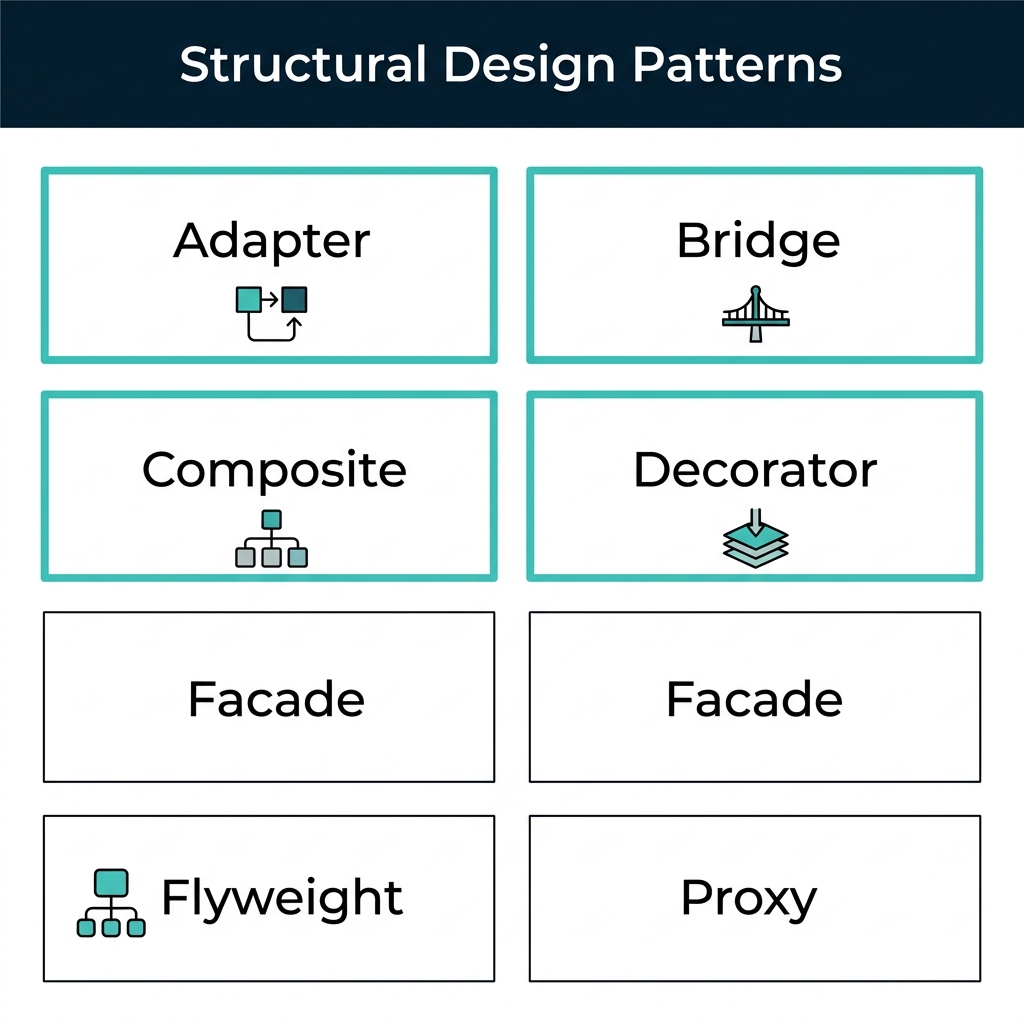
The 7 GoF structural patterns โ we cover the 4 highlighted this week
Creational patterns gave us the individual wood pieces. Structural patterns are the joinery techniques โ dovetail joints, mortise and tenon, screws โ that connect those pieces into a stable, beautiful table. The same pieces can be joined in different ways depending on the need.
Modern ecosystems are built on structural patterns: java.io streams use Decorator, Swing/AWT use Composite, JDBC drivers use Adapter, and Spring Framework uses Proxy extensively. Understanding these patterns means understanding the system itself.
Now that we know how to create objects from Week 11, the next question is: how do we organize and connect those objects? That is exactly where structural patterns help.
| Need in software | How structural patterns help | Code example |
|---|---|---|
| Old code and new code do not match | Adapter makes incompatible interfaces work together | Arrays.asList() adapts arrays to List |
| Abstraction and implementation change independently | Bridge separates the two so both evolve on their own | JDBC Driver architecture |
| Features should be added without modifying the original class | Decorator wraps objects and adds behavior dynamically | BufferedReader(new FileReader(f)) |
| We need tree-like part-whole structures | Composite lets us treat single objects and groups uniformly | Swing JPanel containing JButtons |
In the coming slides we study each structural pattern with the same method: real-world analogy โ core components โ UML diagram โ Code example โ applicability & pros/cons.
The Adapter Pattern makes incompatible interfaces work together without changing their existing code. It acts like a translator between what the client expects and what an old or third-party class already provides.
You land in London with your Pakistani/US charger. The wall has a UK socket. Your charger works perfectly โ it is not broken. The socket works perfectly โ it is not broken. They just do not match.
You buy a travel adapter from the airport shop. It does not change your charger. It does not change the wall. It sits in between and translates one shape into another.
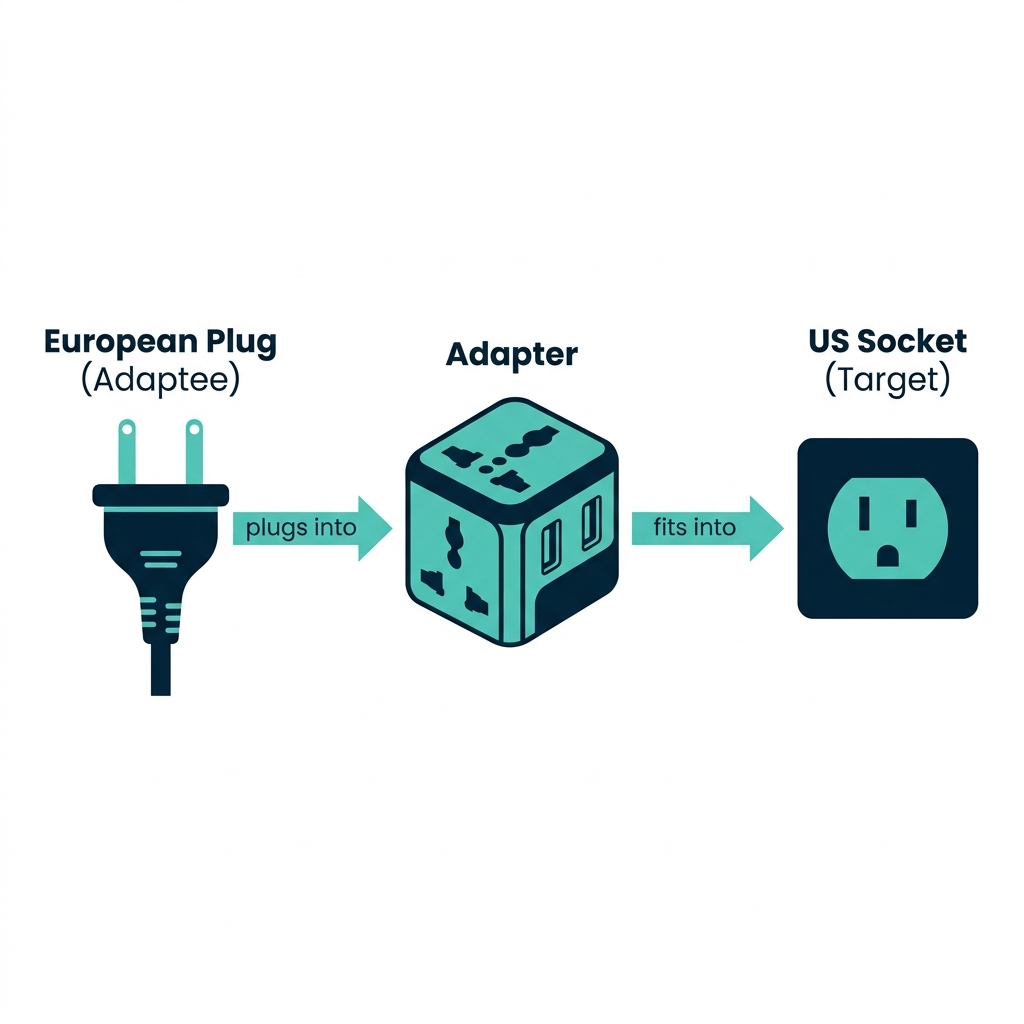
The adapter sits between incompatible interfaces without changing either side
This is the interface the client expects to use.
In our example: USPlug
This is the existing class that already works, but has the wrong interface.
In our example: EuropeanPlug
This class wraps the adaptee and converts its behavior into the target interface.
In our example: PlugAdapter
The client only sees USPlug. It does not need to know that a European plug is hidden inside the adapter.
Calls the interface it understands:
connectUSSocket()
Receives the client call and translates it into the adaptee's language.
Acts like a translator
Runs the existing method it already has:
connectEuropeanSocket()
We did not change the old class. We simply added a small wrapper around it. That means we can integrate legacy or third-party code safely.
The formal UML diagram shows how the four participants connect. Study each arrow carefully.
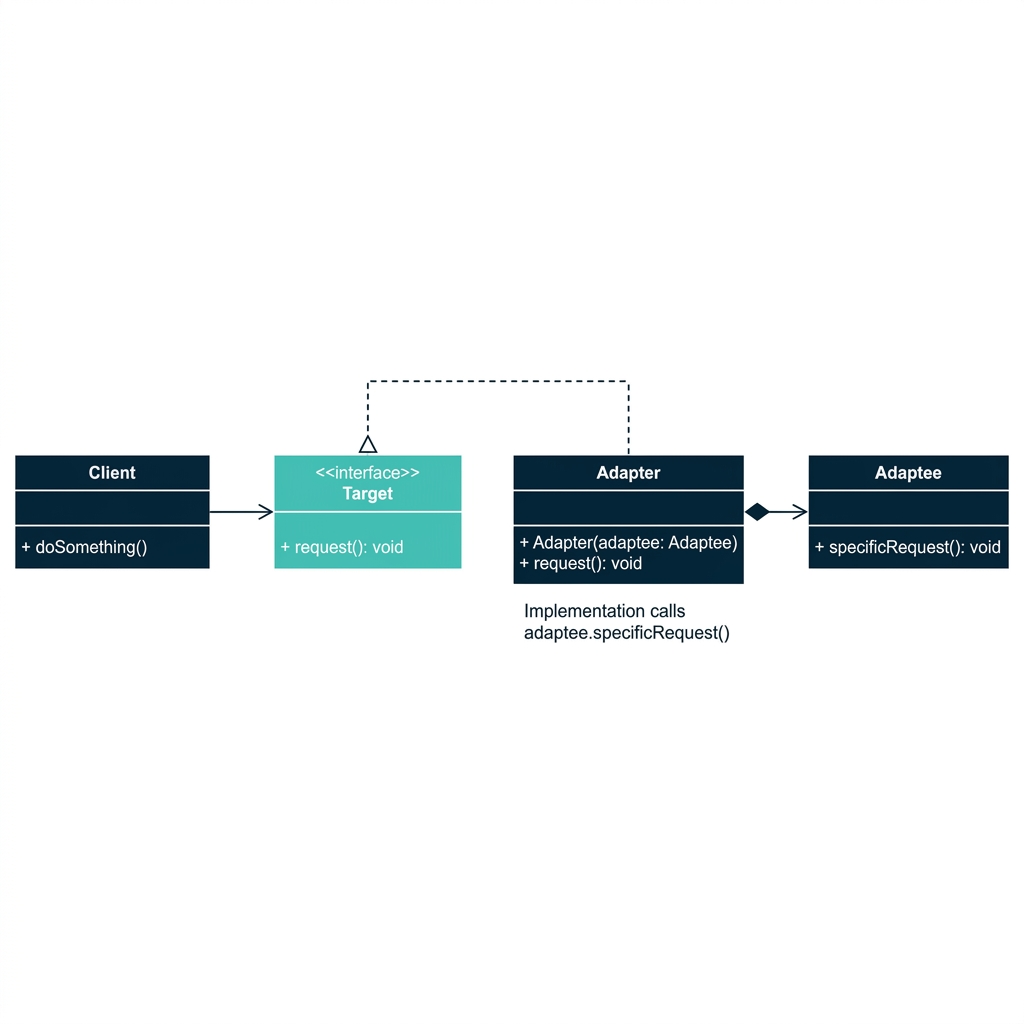
Adapter implements Target and delegates to Adaptee internally
| UML Role | Plug Example |
|---|---|
| Target | USPlug interface |
| Adapter | PlugAdapter class |
| Adaptee | EuropeanPlug class |
| Client | Main class |
First we define the old class that already exists, and the new interface that the client expects.
public class EuropeanPlug {
public void connectEuropeanSocket() {
System.out.println("European plug connected.");
}
}
public interface USPlug {
void connectUSSocket();
}
EuropeanPlug already works, but its method name and expected socket type do not match what the U.S. client code wants.
The adapter implements the target interface and internally holds the adaptee object.
public class PlugAdapter implements USPlug {
private EuropeanPlug europeanPlug;
public PlugAdapter(EuropeanPlug europeanPlug) {
this.europeanPlug = europeanPlug;
}
@Override
public void connectUSSocket() {
System.out.println("Adapter converts U.S. socket request...");
europeanPlug.connectEuropeanSocket();
}
}
The adapter does not replace the old class. It wraps it and forwards the call in a compatible way.
public class Main {
public static void main(String[] args) {
EuropeanPlug europeanPlug = new EuropeanPlug();
USPlug adapter = new PlugAdapter(europeanPlug);
adapter.connectUSSocket();
}
}
Adapter converts U.S. socket request...
European plug connected.
The client believes it is talking to a USPlug. It does not need to care that a EuropeanPlug is inside.
Arrays.asList() โ adapts an array to a List interfaceInputStreamReader โ adapts byte streams to character streamsCollections.enumeration() โ adapts Collection to EnumerationYou have a MicroSD card from your phone, but your laptop only has a standard USB port. You cannot plug the MicroSD card directly into the USB port.
You use a USB Card Reader. The Card Reader serves as the Adapter. It implements the USB interface your laptop (the Client) expects, and translates the data to/from the MicroSD card (the Adaptee).
A company has a legacy XMLParser class but the new system expects a JSONParser interface. Create an XMLToJSONAdapter that implements JSONParser and internally delegates to XMLParser. The legacy class stays untouched, and the new system gets the JSON interface it expects.
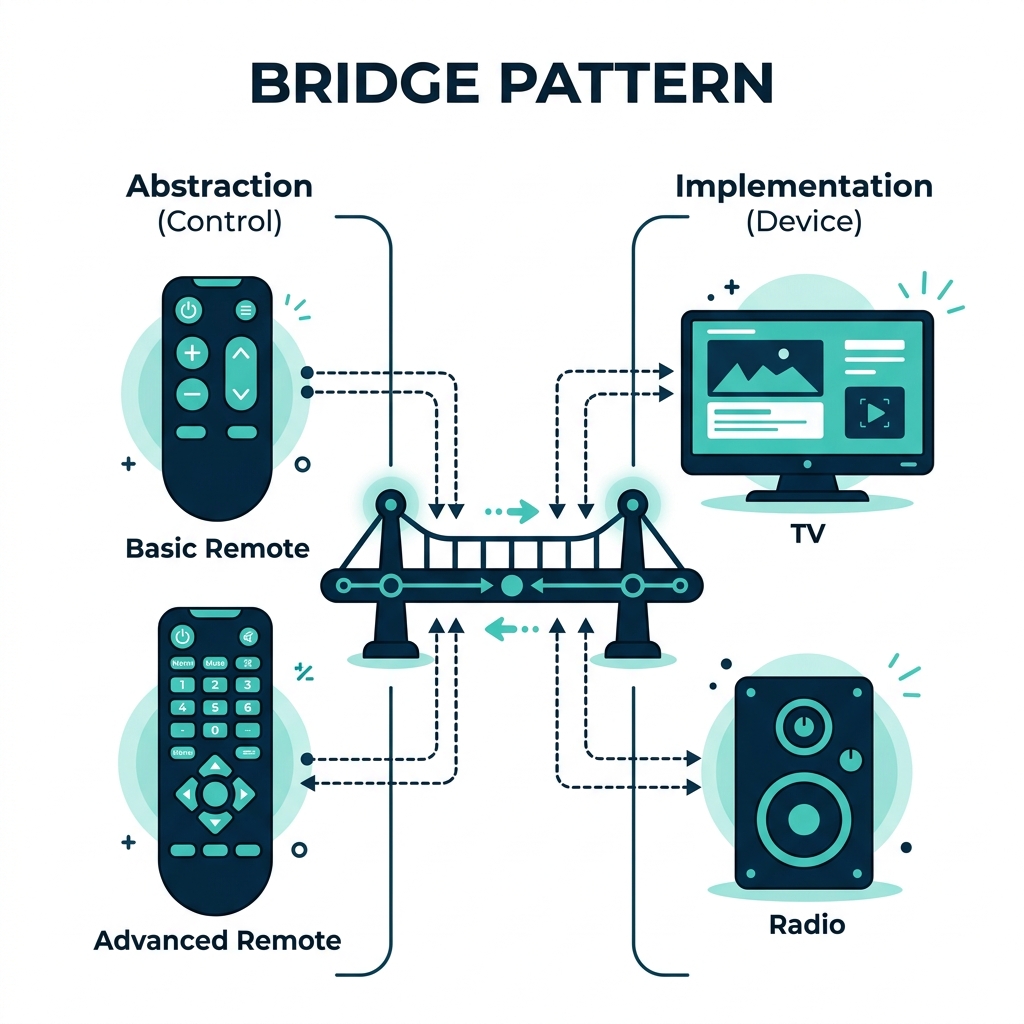
The Bridge Pattern separates what something does (abstraction) from how it does it (implementation), so both can change independently without affecting each other.
Think of a TV remote control. The remote (abstraction) has buttons like power, volume up, channel change. The device it controls (implementation) can be a TV, a Radio, or a Smart Speaker.
A basic remote has simple buttons. An advanced remote adds mute and favorites. Both remote types can work with any device. The remote and the device evolve independently.
BasicTV, BasicRadio, AdvancedTV, AdvancedRadioโฆ โ a class explosion
Any remote can control any device โ they are connected by a bridge, not by inheritance
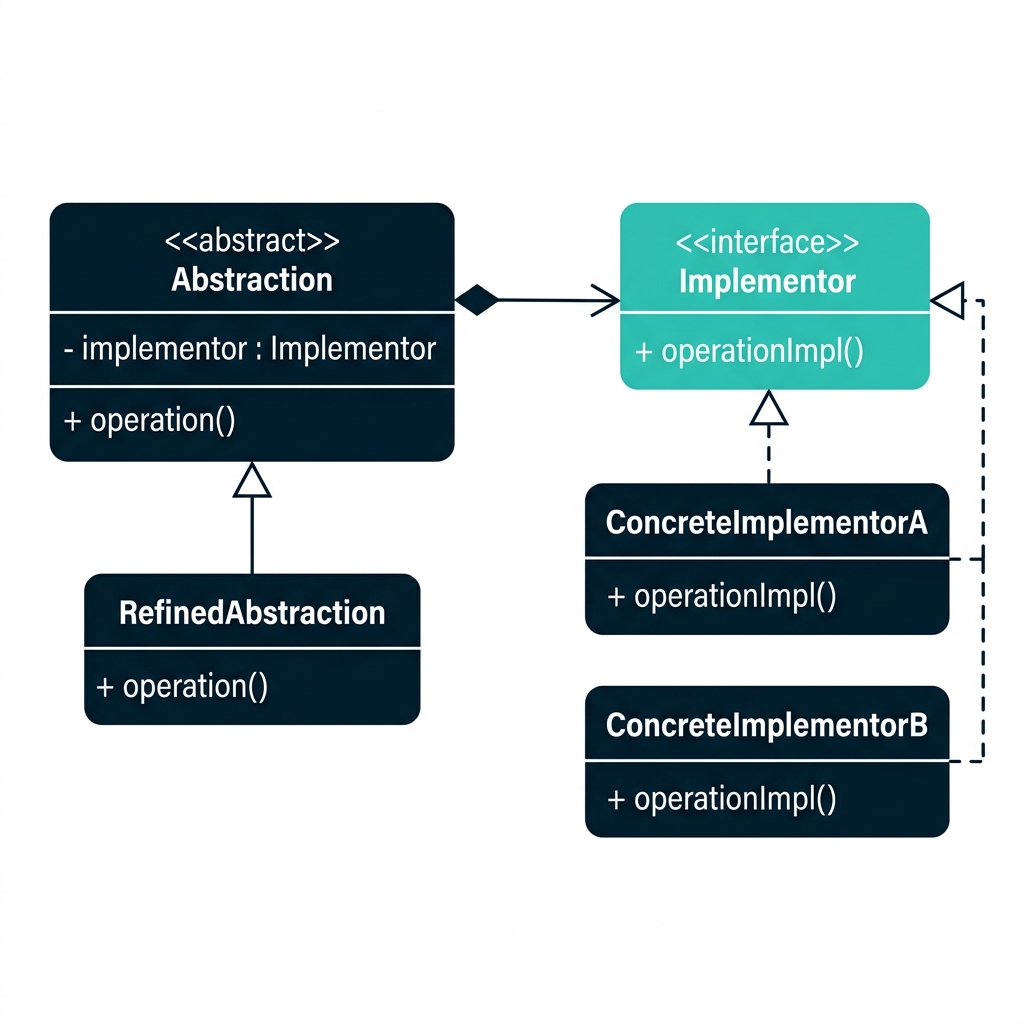
The high-level control layer that the client uses. It holds a reference to an Implementor.
In our example: RemoteControl
A specialized version of the abstraction that extends base functionality.
In our example: AdvancedRemote
The interface that defines what the implementation can do.
In our example: Device
The actual platform-specific classes: TV and Radio. Each provides its own way of turning on/off and changing volume.
The Abstraction does not inherit from the Implementor. Instead, it holds a reference to it. This composition-over-inheritance approach is the actual "bridge" connecting the two hierarchies.
Two parallel hierarchies connected by composition, not inheritance
Adapter is applied after the design โ to fix an incompatibility. Bridge is designed from the start โ to prevent class explosion and keep hierarchies separate.
First, we define the implementation interface and two concrete devices.
public interface Device {
void turnOn();
void turnOff();
void setVolume(int volume);
}
public class TV implements Device {
@Override
public void turnOn() {
System.out.println("TV is ON");
}
@Override
public void turnOff() {
System.out.println("TV is OFF");
}
@Override
public void setVolume(int volume) {
System.out.println("TV volume: " + volume);
}
}
public class Radio implements Device {
@Override
public void turnOn() {
System.out.println("Radio is ON");
}
@Override
public void turnOff() {
System.out.println("Radio is OFF");
}
@Override
public void setVolume(int volume) {
System.out.println("Radio volume: " + volume);
}
}
public class RemoteControl {
protected Device device; // โ The "bridge"
public RemoteControl(Device device) {
this.device = device;
}
public void togglePower() {
device.turnOn();
}
public void volumeUp() {
device.setVolume(10);
}
}
public class AdvancedRemote extends RemoteControl {
public AdvancedRemote(Device device) {
super(device);
}
public void mute() {
device.setVolume(0);
System.out.println("Device is muted.");
}
}
RemoteControl remote = new AdvancedRemote(new TV());
remote.togglePower(); // TV is ON
remote.volumeUp(); // TV volume: 10
((AdvancedRemote) remote).mute(); // TV volume: 0
Swap new TV() with new Radio() and everything works โ zero code changes in the remote classes. That is the power of Bridge.
DriverManager (abstraction) bridges to Driver implementations (MySQL, PostgreSQL, Oracle)The Decorator Pattern lets you add new behavior to objects dynamically by wrapping them in special wrapper objects. It is an alternative to subclassing for extending functionality.
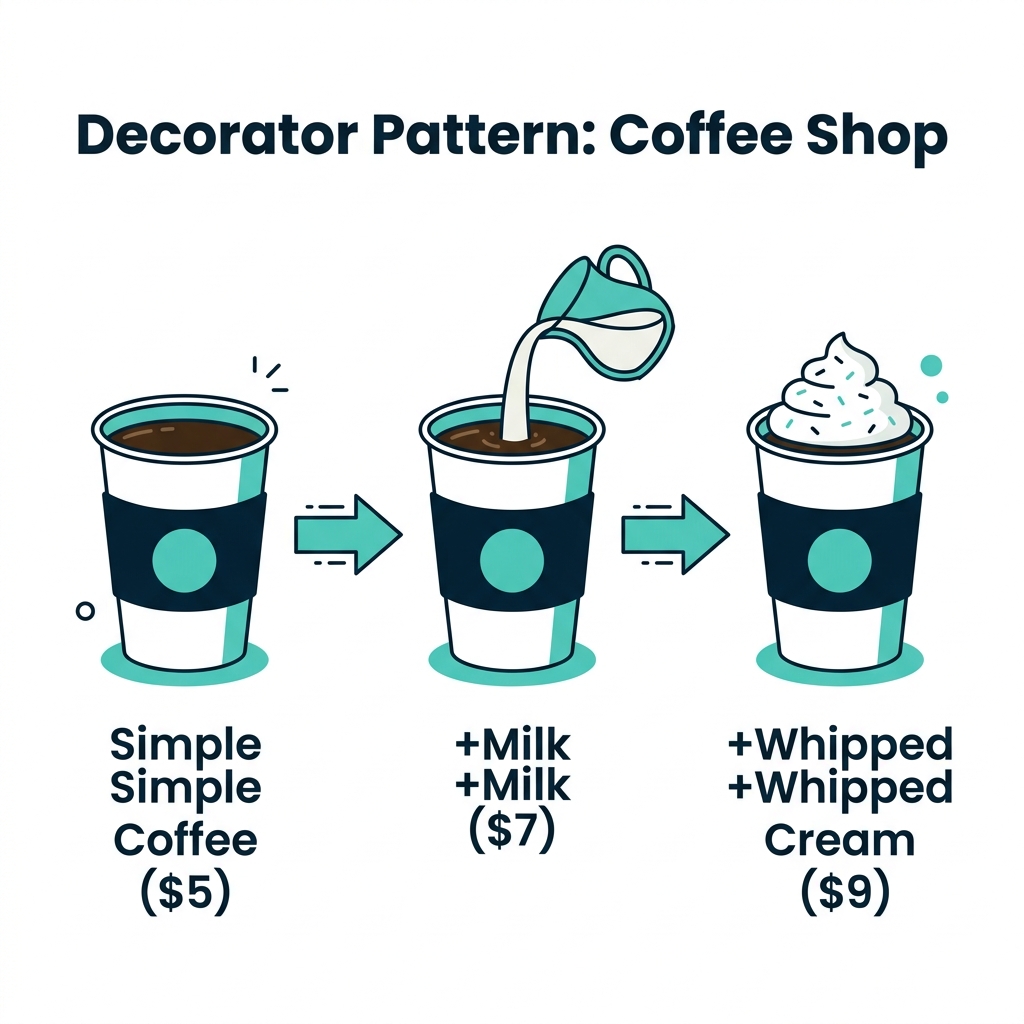
You order a simple coffee (Rs. 500). Then you add milk (+Rs. 200). Then whipped cream (+Rs. 200). Each addition wraps the previous order and adds cost and description โ but the original coffee object is never modified.
Each topping is a decorator: it adds behavior (extra cost, extra name) without changing the original component.
MilkCoffee, WhippedCreamCoffee, MilkWhippedCreamCoffeeโฆ โ class explosion!
Each decorator wraps the previous one, adding behavior layer by layer
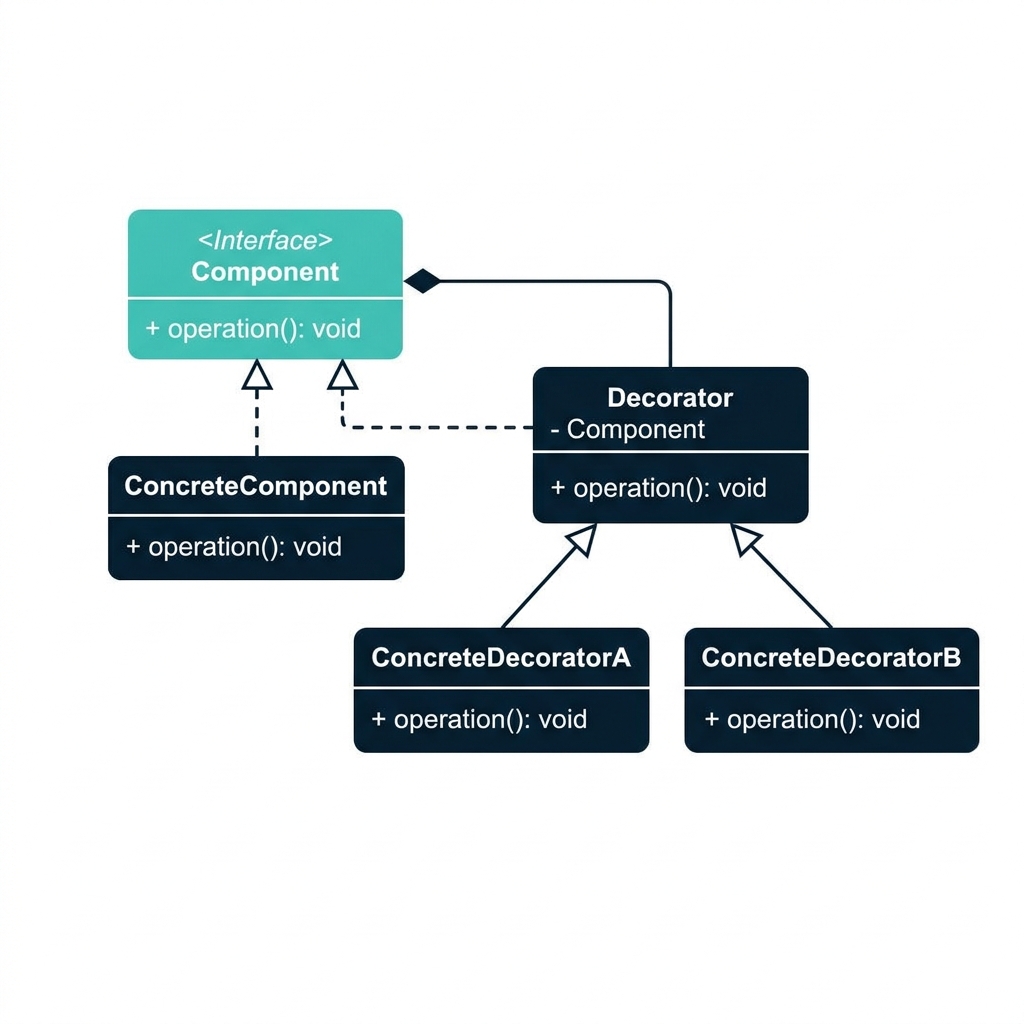
Defines the common interface for both original objects and decorators.
In our example: Coffee
The original object being wrapped. Has basic behavior.
In our example: SimpleCoffee
Implements Component and holds a reference to another Component.
In our example: CoffeeDecorator
MilkDecorator and WhippedCreamDecorator โ each adds its specific behavior (extra cost, extra description) while delegating base behavior to the wrapped component.
Both the original object and all decorators implement the same interface. This means the client cannot tell whether it is talking to a plain coffee or a triple-decorated coffee โ and that is the point!
The Decorator both implements and holds a Component โ it IS-A and HAS-A Component
Adapter changes the interface of an object without adding behavior. Decorator keeps the same interface but adds new behavior. Both use wrapping, but for different purposes.
public interface Coffee {
String getDescription();
double getCost();
}
public class SimpleCoffee implements Coffee {
@Override
public String getDescription() {
return "Simple Coffee";
}
@Override
public double getCost() {
return 500.0;
}
}
SimpleCoffee works perfectly on its own. A customer can order it as-is. But we want to add toppings without modifying this class.
public abstract class CoffeeDecorator implements Coffee {
protected Coffee decoratedCoffee; // โ wraps another Coffee
public CoffeeDecorator(Coffee coffee) {
this.decoratedCoffee = coffee;
}
}
public class MilkDecorator
extends CoffeeDecorator {
public MilkDecorator(Coffee coffee) {
super(coffee);
}
@Override
public String getDescription() {
return decoratedCoffee
.getDescription() + ", Milk";
}
@Override
public double getCost() {
return decoratedCoffee
.getCost() + 200.0;
}
}
public class WhippedCreamDecorator
extends CoffeeDecorator {
public WhippedCreamDecorator(Coffee coffee) {
super(coffee);
}
@Override
public String getDescription() {
return decoratedCoffee
.getDescription()
+ ", Whipped Cream";
}
@Override
public double getCost() {
return decoratedCoffee
.getCost() + 200.0;
}
}
public class Main {
public static void main(String[] args) {
// Start with a simple coffee
Coffee coffee = new SimpleCoffee();
System.out.println(coffee.getDescription() + " โ Rs. " + coffee.getCost());
// Wrap with milk
coffee = new MilkDecorator(coffee);
System.out.println(coffee.getDescription() + " โ Rs. " + coffee.getCost());
// Wrap with whipped cream
coffee = new WhippedCreamDecorator(coffee);
System.out.println(coffee.getDescription() + " โ Rs. " + coffee.getCost());
}
}
Simple Coffee โ Rs. 500.0
Simple Coffee, Milk โ Rs. 700.0
Simple Coffee, Milk, Whipped Cream โ Rs. 900.0
Each decorator wraps the previous result. You can stack as many as you want in any order. Adding a new topping means creating one new class โ not rewriting the existing ones.
At every stage, the variable coffee still has type Coffee. The client never needs to know how many decorators are wrapped inside. It just calls getCost() and gets the right answer.
Many I/O libraries are built on the Decorator Pattern:
// Each wrapper adds a new capability โ same pattern as our coffee example!
BufferedReader reader = new BufferedReader( // adds buffering
new InputStreamReader( // adapts bytes โ chars
new FileInputStream("data.txt") // reads raw bytes
)
);
FileInputStream = simple coffee. InputStreamReader = first decorator. BufferedReader = second decorator. Same concept!
The Composite Pattern lets us build tree-like structures so that we can treat individual objects and groups of objects in the same way.
Can I call the same operation on one object and on a whole group of objects? Composite says yes, if both follow the same component interface.
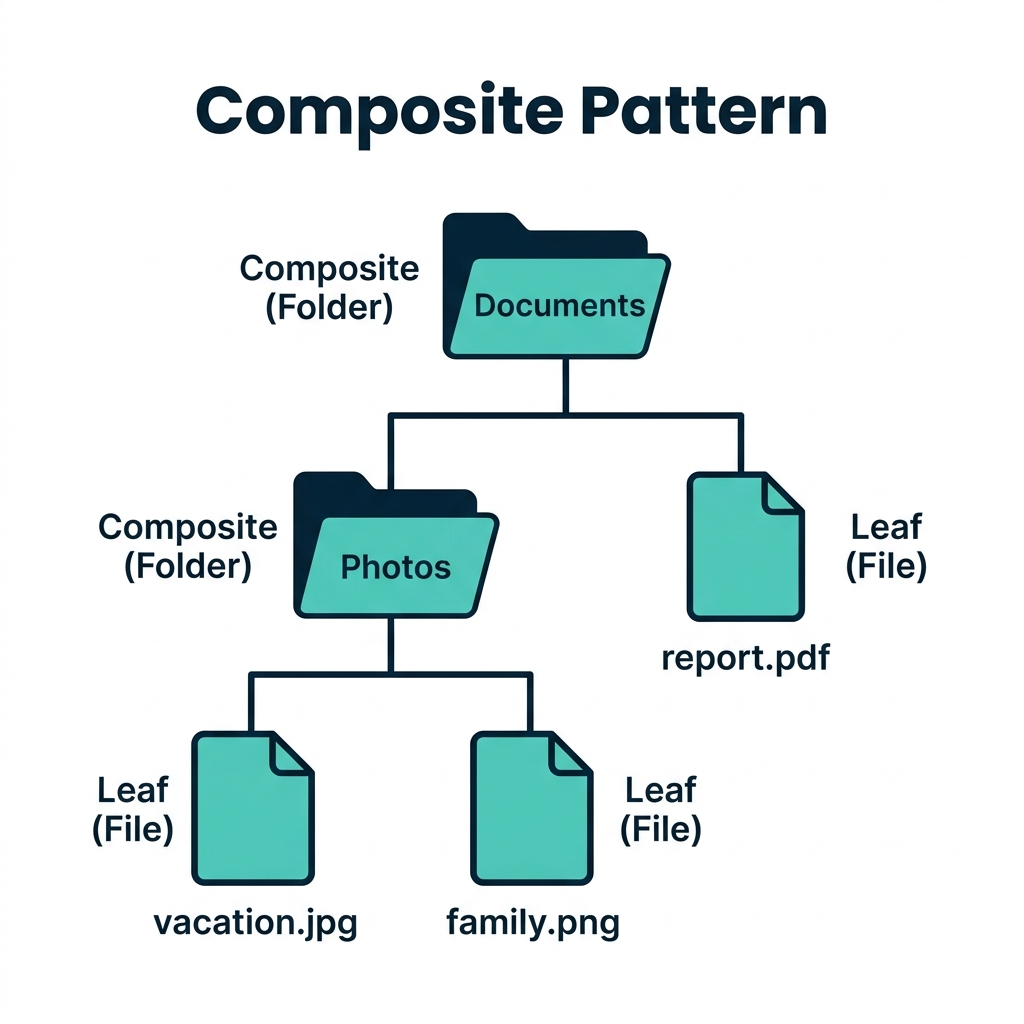
A folder can contain files or other folders, forming a tree structure
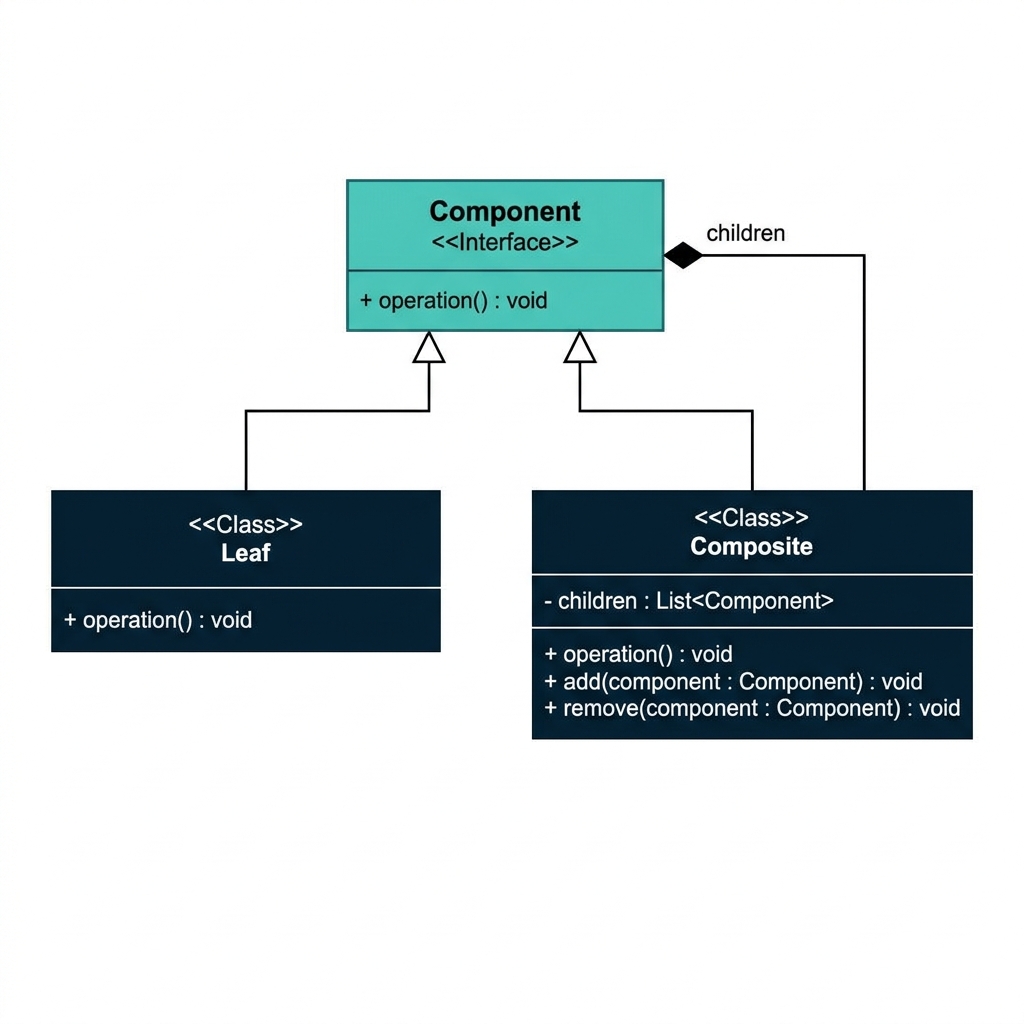
A manager may contain developers, another manager, or both. That is why the structure becomes a tree.
Director
โโโ Manager A
โ โโโ Developer 1
โ โโโ Developer 2
โโโ Manager B
โ โโโ Developer 3
โ โโโ Manager C
โ โโโ Developer 4
โ โโโ Developer 5
The whole company is made of smaller parts, and those parts may themselves contain smaller parts.
Composite both implements Component and holds a list of Components
Notice the line from Composite back to Component. Since a Composite holds a list of Components, and a Composite is a Component, it can hold other Composites inside itself indefinitely!

Calls one common method:
showDetails()
The manager/director receives the call and forwards it to every child employee.
Each developer prints its own details when the call reaches it.
The client does not need separate logic for one employee vs a whole team. It simply calls the same method on the top object.
We start with a common component interface, then create the leaf class for individual employees.
public interface Employee {
void showDetails();
}
public class Developer implements Employee {
private String name;
private String position;
public Developer(String name, String position) {
this.name = name;
this.position = position;
}
@Override
public void showDetails() {
System.out.println(name + " works as " + position + ".");
}
}
The composite also implements Employee, but instead of printing one line, it stores a list of child employees and delegates the call.
import java.util.ArrayList;
import java.util.List;
public class Manager implements Employee {
private List<Employee> employees = new ArrayList<>();
public void add(Employee employee) {
employees.add(employee);
}
public void remove(Employee employee) {
employees.remove(employee);
}
@Override
public void showDetails() {
for (Employee employee : employees) {
employee.showDetails();
}
}
}
Manager and Developer both implement Employee, so the client can treat both uniformly.
public class Main {
public static void main(String[] args) {
Developer dev1 = new Developer("Ali", "Backend Developer");
Developer dev2 = new Developer("Sara", "Frontend Developer");
Developer dev3 = new Developer("Hamza", "Mobile Developer");
Manager managerA = new Manager();
managerA.add(dev1);
managerA.add(dev2);
Manager director = new Manager();
director.add(managerA);
director.add(dev3);
director.showDetails();
}
}
The call starts at director.showDetails(), then automatically propagates to managerA and finally to each developer.
The client never needs separate code for director, manager, and developer. It works with the common Employee interface only.
Behavioral design patterns focus on how objects communicate and cooperate. If structural patterns tell us how to connect objects, behavioral patterns tell us how those connected objects should act together.
Think of a company. Structural patterns help organize the departments. Behavioral patterns decide how instructions, messages, and decisions move between employees and managers.
Software systems are full of interactions: button clicks, menu actions, events, service calls, job queues, schedulers, and message passing. Behavioral patterns help make these interactions clear, flexible, and maintainable.
| Need in software | Behavioral help |
|---|---|
| Encapsulate actions as reusable units | Command |
| Choose one algorithm at runtime | Strategy |
| Notify many listeners about one event | Observer |
| Pass requests along a chain | Chain of Responsibility |
We start with Command because it is one of the clearest behavioral patterns: it turns a request into an object.
Once classes are connected and structured properly, how should actions flow through the system? That is where behavioral patterns begin.
Command Pattern wraps a request inside an object so that the sender does not need to know the details of the receiver.
The Command Pattern encapsulates a request as an object. This decouples the sender of the request from the receiver that performs the work.
Instead of saying โremote, directly turn on the TV,โ we create a TurnOnCommand object and hand it to the remote. The remote just executes the command.
Once a request becomes an object, it can be stored, queued, logged, repeated, or undone later.
The remote does not need device details; it just triggers a command
The remote does not know how a TV changes channels or how a stereo adjusts volume. It only knows how to call execute() on a command object.
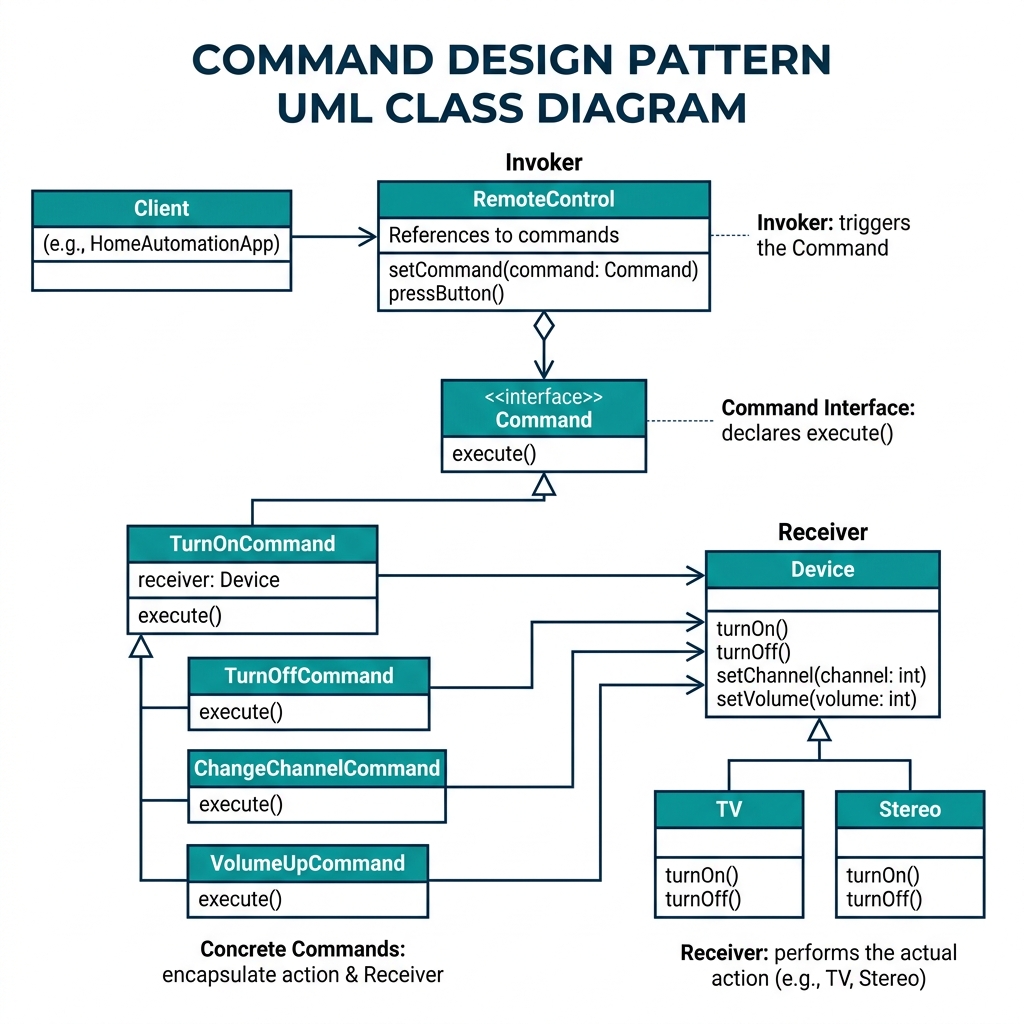
Common interface with one method, usually execute().
Specific actions like TurnOnCommand or ChangeChannelCommand.
The real device or object that performs the work, such as TV or Stereo.
The object that triggers the command. In our example, it is RemoteControl.
The invoker knows only the command interface, not the receiverโs internal methods.
Invoker holds a command, commands talk to receivers
execute()public interface Command {
void execute();
}
class TurnOnCommand implements Command {
private Device device;
public TurnOnCommand(Device device) {
this.device = device;
}
@Override
public void execute() {
device.turnOn();
}
}
class TurnOffCommand implements Command {
private Device device;
public TurnOffCommand(Device device) {
this.device = device;
}
@Override
public void execute() {
device.turnOff();
}
}
interface Device {
void turnOn();
void turnOff();
}
class TV implements Device {
public void turnOn() { System.out.println("TV is now on"); }
public void turnOff() { System.out.println("TV is now off"); }
public void changeChannel() { System.out.println("Channel changed"); }
}
class Stereo implements Device {
public void turnOn() { System.out.println("Stereo is now on"); }
public void turnOff() { System.out.println("Stereo is now off"); }
public void adjustVolume() { System.out.println("Volume adjusted"); }
}
class RemoteControl {
private Command command;
public void setCommand(Command command) {
this.command = command;
}
public void pressButton() {
if (command != null) {
command.execute();
} else {
System.out.println("No command assigned");
}
}
}
public class Main {
public static void main(String[] args) {
TV tv = new TV();
Stereo stereo = new Stereo();
Command turnOnTV = new TurnOnCommand(tv);
Command turnOffTV = new TurnOffCommand(tv);
RemoteControl remote = new RemoteControl();
remote.setCommand(turnOnTV);
remote.pressButton();
remote.setCommand(turnOffTV);
remote.pressButton();
}
}
The Iterator Pattern provides a way to access the elements of a collection one by one without exposing how that collection is stored internally.
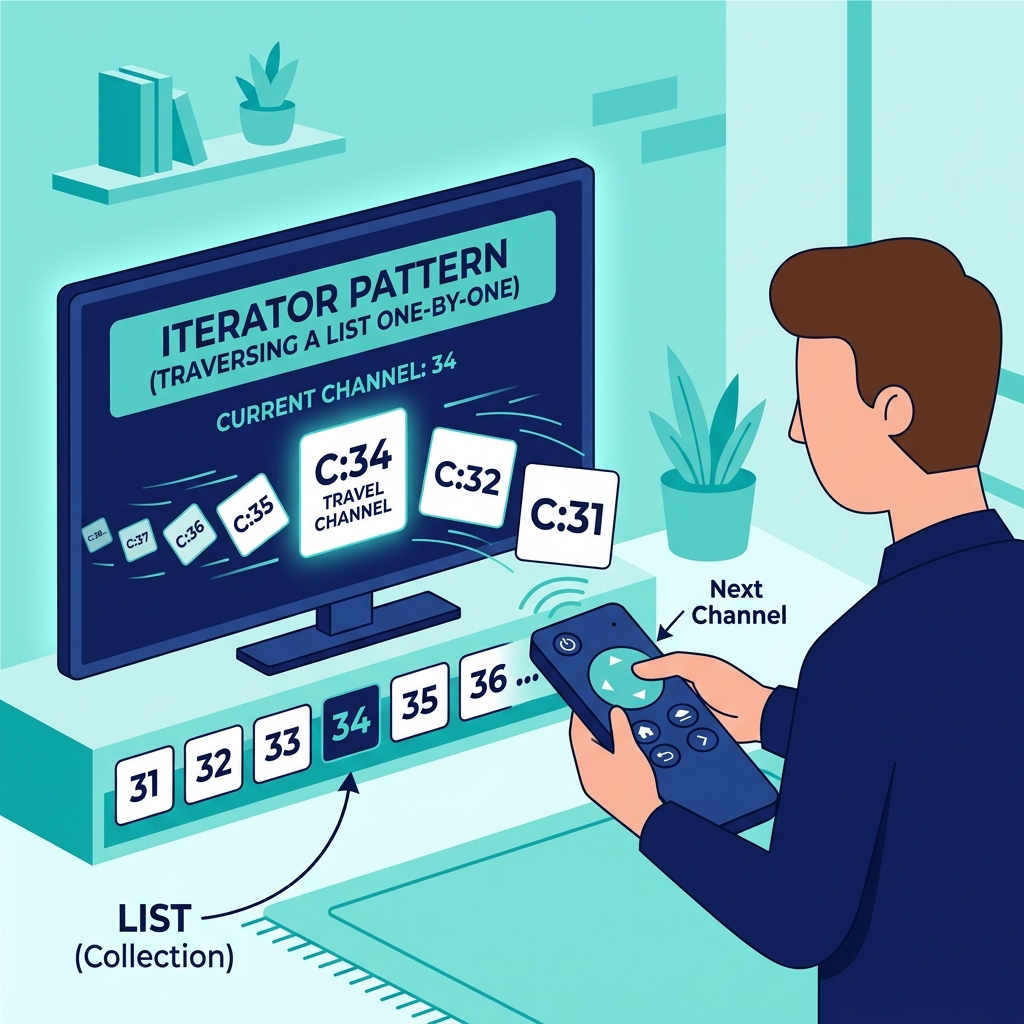
Pressing next on a remote abstracts the collection of channels
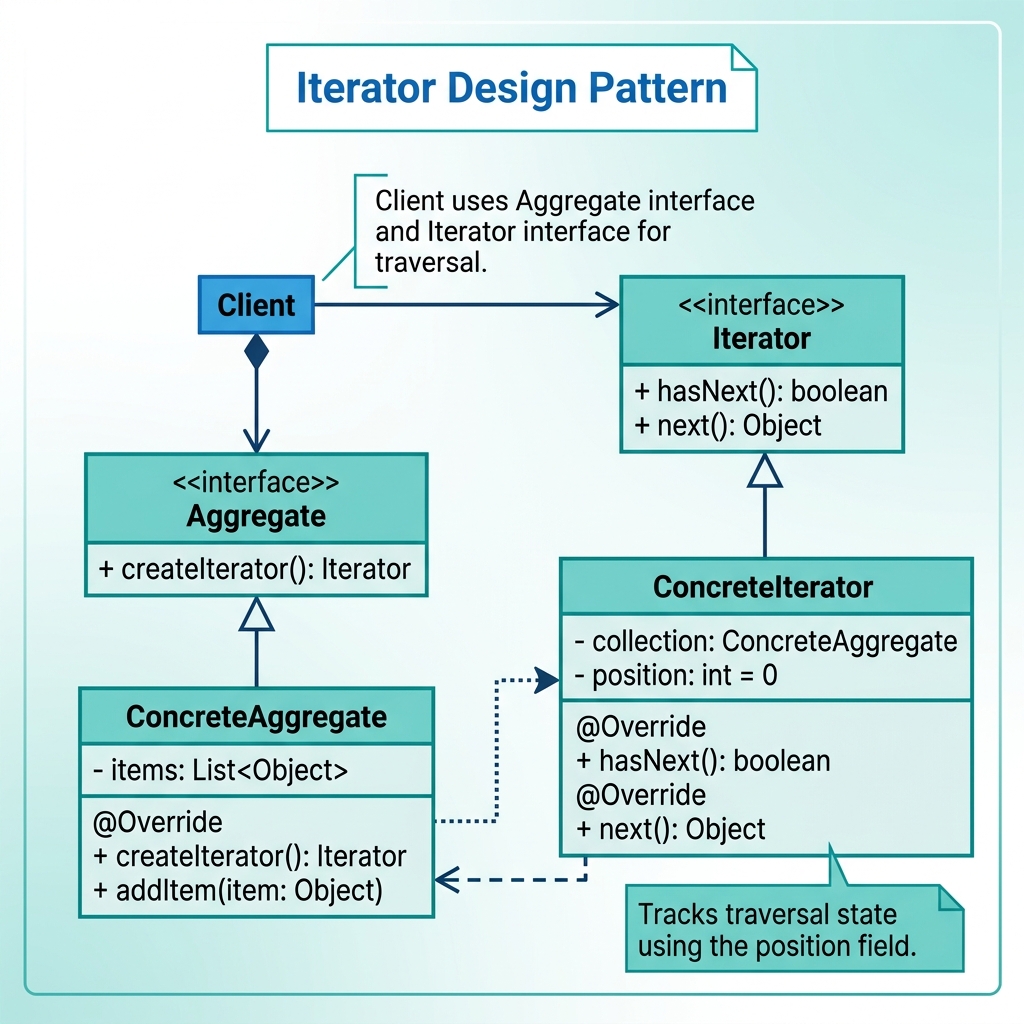
The client interacts only with the Iterator and Aggregate interfaces
hasNext(), next()).createIterator() method.Suppose a company stores employees in a collection, and we want to calculate the total salary by visiting each employee one by one.

The Company gives us an iterator. The iterator keeps track of the current position and exposes only hasNext() and next().
Provides an iterator
Moves through employees one by one
Reads salaries and calculates the total
We begin by defining two small interfaces: one for traversal and one for creating iterators.
interface Iterator<T> {
boolean hasNext();
T next();
}
interface Aggregate<T> {
Iterator<T> createIterator();
}
Any collection that implements Aggregate<T> promises that it can create an iterator for its elements.
class EmployeeIterator implements Iterator<Employee> {
private int currentIndex = 0;
private List<Employee> employees;
public EmployeeIterator(List<Employee> employees) {
this.employees = employees;
}
@Override
public boolean hasNext() {
return currentIndex < employees.size();
}
@Override
public Employee next() {
if (!hasNext()) {
throw new NoSuchElementException();
}
return employees.get(currentIndex++);
}
}
class Company implements Aggregate<Employee> {
private List<Employee> employees;
public Company(List<Employee> employees) {
this.employees = employees;
}
@Override
public Iterator<Employee> createIterator() {
return new EmployeeIterator(employees);
}
}
import java.util.ArrayList;
import java.util.List;
import java.util.NoSuchElementException;
class Employee {
private String name;
private double salary;
public Employee(String name, double salary) {
this.name = name;
this.salary = salary;
}
public double getSalary() {
return salary;
}
}
public class Main {
public static void main(String[] args) {
List<Employee> employees = new ArrayList<>();
employees.add(new Employee("Alice", 50000));
employees.add(new Employee("Bob", 60000));
employees.add(new Employee("Charlie", 70000));
Company company = new Company(employees);
Iterator<Employee> iterator = company.createIterator();
double totalSalary = 0;
while (iterator.hasNext()) {
totalSalary += iterator.next().getSalary();
}
System.out.println("Total salary: " + totalSalary);
}
}
Total salary: 180000.0
The Observer Pattern creates a one-to-many relationship between a subject and its observers. When the subject changes, all registered observers are notified automatically.
Think of a YouTube channel. When the channel uploads a new video, all subscribers get notified automatically. The channel does not directly call each subscriberโs personal code.
One subject, many observers, automatic notification on change
notifyObservers()update() methodGreat for event-driven systems, weather alerts, stock updates, GUI listeners, and publish-subscribe style applications.
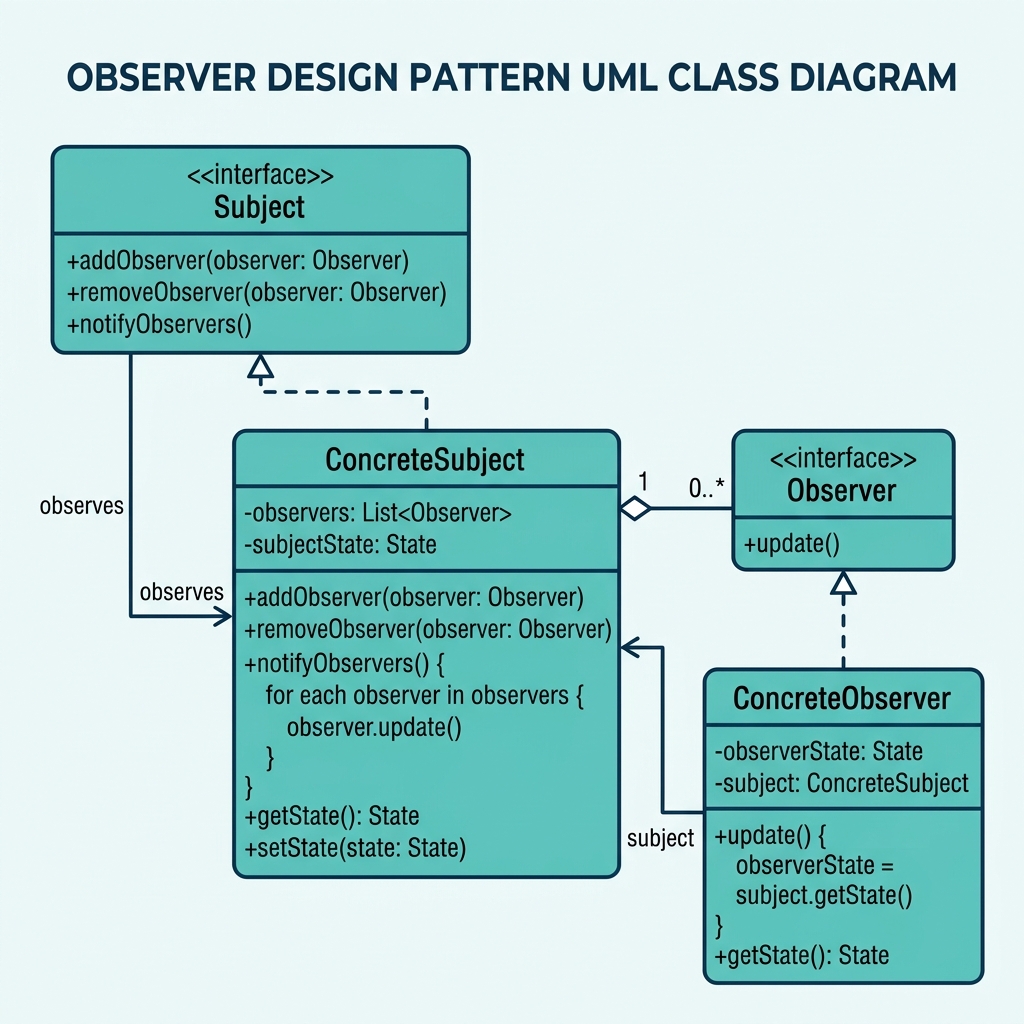
Subject manages observers; concrete observers react to updates
update()WeatherStationPhoneDisplay, TVDisplaypublic interface Subject {

void addObserver(Observer observer);
void removeObserver(Observer observer);
void notifyObservers();
}
public interface Observer {
void update(String weather);
}
The subject controls the subscription list, and every observer promises that it knows how to react when an update arrives.
import java.util.ArrayList;
import java.util.List;
class WeatherStation implements Subject {
private List<Observer> observers = new ArrayList<>();
private String weather = "";
@Override
public void addObserver(Observer observer) {
observers.add(observer);
}
@Override
public void removeObserver(Observer observer) {
observers.remove(observer);
}
@Override
public void notifyObservers() {
for (Observer observer : observers) {
observer.update(weather);
}
}
public void setWeather(String newWeather) {
this.weather = newWeather;
notifyObservers();
}
}
The weather station does not know how each display shows the weather. It only knows how to notify its observers.
class PhoneDisplay implements Observer {
@Override
public void update(String weather) {
System.out.println("Phone Display: Weather updated - " + weather);
}
}
class TVDisplay implements Observer {
@Override
public void update(String weather) {
System.out.println("TV Display: Weather updated - " + weather);
}
}
public class WeatherApp {
public static void main(String[] args) {
WeatherStation weatherStation = new WeatherStation();
Observer phoneDisplay = new PhoneDisplay();
Observer tvDisplay = new TVDisplay();
weatherStation.addObserver(phoneDisplay);
weatherStation.addObserver(tvDisplay);
weatherStation.setWeather("Sunny");
weatherStation.setWeather("Rainy");
weatherStation.setWeather("Cloudy");
weatherStation.removeObserver(tvDisplay);
weatherStation.setWeather("Windy");
}
}
Creational patterns answered one main question: How should objects be created? We studied five important patterns, each solving a different creation problem.
| Pattern | Main use | Simple memory line |
|---|---|---|
| Factory Method | Create one product, but let subclasses choose the exact type | Subclass decides what to create |
| Abstract Factory | Create families of related objects | One factory creates a matching set |
| Builder | Construct complex objects step by step | Build one object gradually |
| Prototype | Create by copying an existing object | Clone instead of rebuild |
| Singleton | Ensure only one shared instance exists | Exactly one object globally |
Creational patterns are all about object birth, but each one solves a different birth problem: choice, families, step-by-step assembly, cloning, or uniqueness.
Structural patterns answered the next question: Once objects exist, how should we connect them?
If creational patterns are about creating parts, structural patterns are about joining those parts together in flexible ways.
| Pattern | Main question |
|---|---|
| Adapter | How can two incompatible classes work together? |
| Bridge | How can abstraction and implementation vary independently? |
| Decorator | How can we add features without changing the original class? |
| Composite | How can we treat a whole group the same way as a single object? |
Behavioral patterns focus on communication and responsibility. They answer: How should objects interact?
Behavioral patterns reduce hard-coded communication. They help actions, traversals, and notifications happen in a cleaner and more decoupled way.
| Pattern | Simple memory line |
|---|---|
| Command | Package an action as an object |
| Iterator | Walk through a collection without exposing its internals |
| Observer | One object changes, many others update automatically |
| Category | Pattern | What it really does |
|---|---|---|
| Creational | Factory Method | Chooses one concrete product through subclasses |
| Abstract Factory | Creates matching families of products | |
| Builder | Builds one complex object step by step | |
| Prototype | Copies an existing object | |
| Singleton | Restricts creation to one shared instance | |
| Structural | Adapter | Makes incompatible interfaces work together |
| Bridge | Separates abstraction from implementation | |
| Decorator | Adds behavior dynamically through wrapping | |
| Composite | Builds tree-like part-whole structures | |
| Behavioral | Command | Turns a request into an object |
| Iterator | Traverses a collection safely and uniformly | |
| Observer | Synchronizes many dependents automatically |
Design patterns are not about memorizing fancy names. They are about recognizing recurring design problems and applying proven solutions with the right trade-offs.
Creational = how objects are born.
Structural = how objects are joined.
Behavioral = how objects talk.
Do not use a pattern just because it sounds smart. Use it only when it solves a real software design problem cleanly.