BS Software Engineering - IV - A
Instructor: Baber Sheikh (Visiting Faculty)
Chapter 2: Software Architecture Design Space
"The fundamental organization of a system embodied in its elements, their relationships to each other and to the environment, and the principles guiding its design and evolution."
Modules, objects, services that perform specific functions
Communication channels between elements
Rules governing how elements integrate
Software architecture connects what the customer wants (requirements) with what developers build (implementation)
Each module should have a single, well-defined responsibility
Example: AuthService handles ONLY authentication, not emails
Modules should have minimal dependencies on each other
Example: Changing database shouldn't affect UI
Implementation:
Maintainability, Testability, Portability, Scalability
Runtime:
Performance, Security, Availability, Reliability
Business:
Time to Market, Cost, Lifetime
You CANNOT maximize all quality attributes simultaneously. Security vs Usability, Performance vs Cost, etc.
Here's how YouTube actually works at scale!
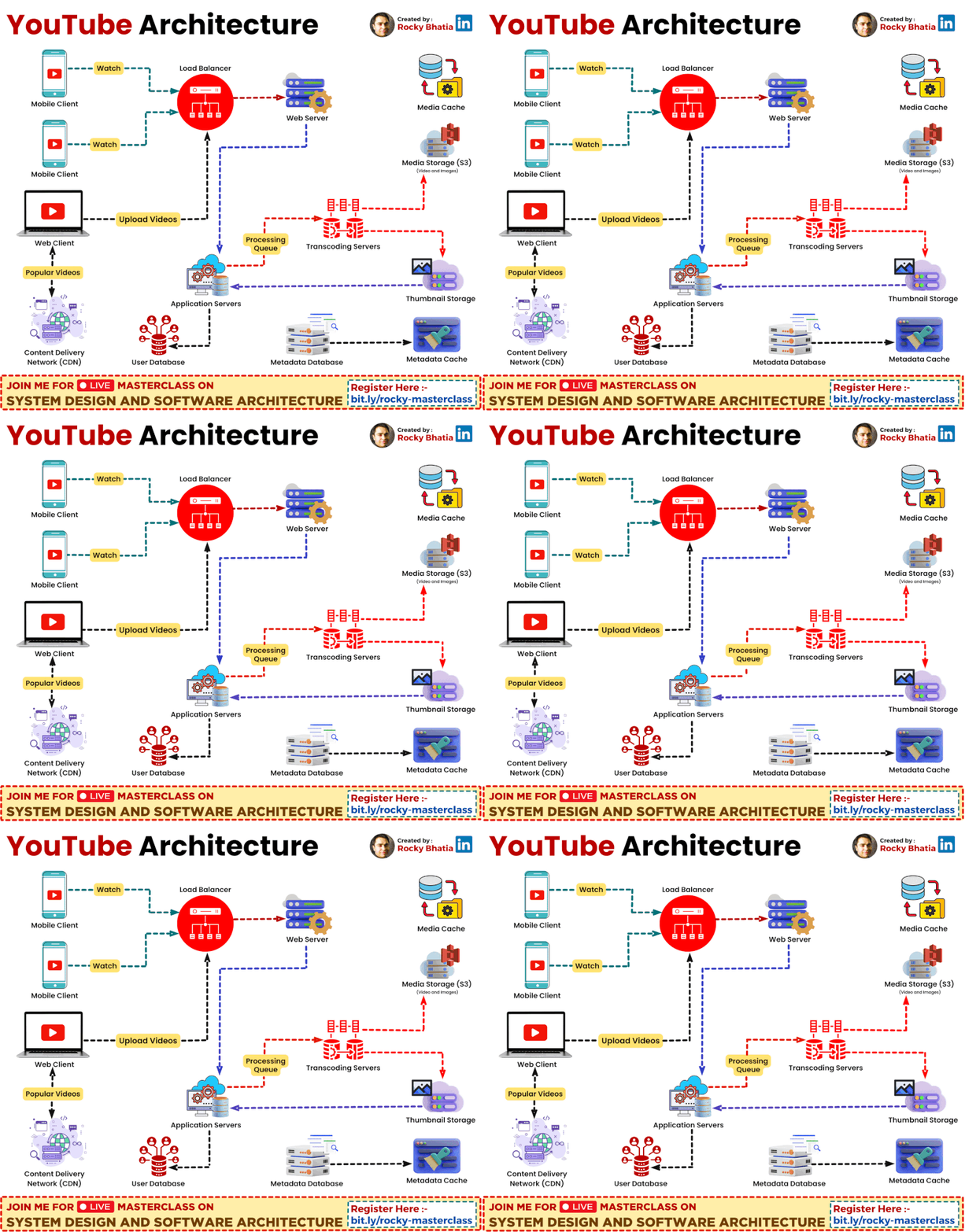
Used for rapid development. Powers web interface and APIs.
Used for video processing. Python would be too slow for this!
Standard MySQL cannot handle YouTube's scale!
Vitess shards MySQL (splits data into smaller pieces)
Manages billions of video records efficiently
Servers located near your location!
Videos are served from nearby edge servers, not from US data centers.
Enables fast delivery + low latency
YouTube's success secret: Right tool for the right job!
Python for speed of development, C++ for speed of execution
Design Space is like a menu card for architects. It contains ALL the options available to build software!
A software architect must:
Architecture =
Elements + Connectors
Elements do the work, Connectors link them together!
Elements: Shopping Cart, Payment System, Inventory Database
Connectors: REST API calls between them
Software elements can be viewed from two perspectives - what you CODE vs what RUNS!
What's RUNNING in memory
📍 Example: When you open Chrome, 10+ processes start running!
What's WRITTEN in files
📍 Example: Your .java or .py files sitting in VS Code
Elements can be on the same computer, same network, or across the Internet. Connectors change accordingly!
| Location | Connector Type | Speed | Real Example |
|---|---|---|---|
| Same Process | Local Method Call | ⚡ Fastest (nanoseconds) | Function calling another function |
| Same Computer | Inter-Process Communication | 🔶 Fast (microseconds) | Chrome tabs talking to main process |
| Same Network (Intranet) | Remote Method Invocation | 🔴 Medium (milliseconds) | Office apps → Office database |
| Across Internet | REST API / Message Queue | 🔴 Slowest (100ms+) | Your app → Google Maps API |
Connectors can work in Synchronous (wait for response) or Asynchronous (don't wait) mode!
Connectors are the relationships you define in code between different parts!
import React from 'react';
from django.db import models
Your code DEPENDS on another library
class Dog extends Animal { }
class Car(Vehicle):
Child class INHERITS from parent
interface PaymentGateway {
    pay(amount): boolean;
}
Defines CONTRACT between components
cat file.txt | grep "error" | wc -l
Output of one → Input of next
Today's software industry has constantly changing requirements!
2007: DVD mailing service → 2023: Global streaming with 200+ million users!
Their architecture evolved from simple servers to 700+ microservices. Good design space understanding made this possible!
Over the last decade, information technology has gone through significant changes. Let's see what's new!
Build software from reusable parts
Like LEGO blocks!
Enhanced encapsulation
Pre-built foundations!
Flexible connector technologies
Talk to anything!
🎯 Key Takeaway: Understanding Design Space helps you choose the right technologies for your project!
"A software architecture design can be described with various software structures, each from a different perspective."
The code files and their organization
📍 What you see in VS Code
What is actually running
⭐ This is the FOCUS of the book!
How the team is organized
📍 Project management view
Each structure uses different connector types and has different performance attributes!
The physical files that make up your software project!
Main elements are source code modules
📍 Example: Your Python .py files in PyCharm
Elements become binary versions
📍 Note: Multiple source files → Single deployment unit
Module A is connected to Module B if and only if A needs to invoke methods in B during execution!
| Attribute | Description | Example |
|---|---|---|
| ➡️ Direction | If A calls B, there's a unidirectional connector from A → B | UserController → UserService (one-way) |
| 🔄 Synchronization | Method call can be synchronous (wait) or asynchronous (don't wait) | Sync: HTTP request Async: Message queue |
| 📊 Sequence | Some connectors must be used in particular order | Login → Get Token → Access API |
1️⃣ Module A calls Module B and passes a callback reference
2️⃣ Later, an event in B triggers a callback TO A
Both have the same sequence ID but different sequence numbers!
Java is a perfect example to understand static structure!
// File: com/myapp/UserService.java
package com.myapp;

public class UserService {
    // ...
}
Packages inside packages → Tree structure
com/
└── myapp/
    ├── controllers/
    │   └── UserController.java
    ├── services/
    │   └── UserService.java
    └── models/
        └── User.java
Naming:
com.myapp.services.UserService
📌 Import creates linear ordering + Subunits create tree = Complete Static Structure!
Layers of abstraction (visibility) and refinement (encapsulation)
Abstraction / Visibility
// UserController (client) uses UserService (server)
UserService service = new UserService();
User user = service.findById(123);
Encapsulation / Decomposition
// Animal (parent) refined into Dog, Cat (children)
class Animal { }
class Dog extends Animal { }
class Cat extends Animal { }
"Static structure plays a critical role in software architecture design."
Since systems are developed incrementally, tight control of static structure in physical software elements is essential!
At runtime, a project consists of threads, processes, functional units, and data units!
Parallel execution paths within a process
Example: Browser rendering thread + JS thread
Running programs with their own memory
Example: Each Chrome tab = separate process
Live instances in memory at execution time
Example: UserService object handling requests
Same code element → Multiple runtime elements: One client module can run on MANY client computers!
Multiple code elements → Single runtime element: Many classes from different packages can run in the same thread!
Runtime connectors inherit static attributes PLUS have these additional attributes!
| Attribute | Description | Example |
|---|---|---|
| 🔢 Multiplicity | One element can connect to multiple elements | Load balancer → 5 servers |
| 📏 Distance & Media | Same thread / process / computer / across network | LAN (fast) vs Internet (slow) |
| 🌐 Universally Invocable | Any system can invoke, regardless of platform/language | REST API (anyone can call) |
| 📝 Self-Descriptive | No pre-installation needed to invoke | WSDL, OpenAPI docs |
Critical for heterogeneous enterprise systems that must integrate efficiently!
Allows dynamic service discovery - choose providers at runtime!
Two processes waiting for each other forever!
Thread A: Lock X, waiting for Y
Thread B: Lock Y, waiting for X
// Both stuck forever! 💀
📍 Analogy: Two cars in narrow lane, neither can pass
Unpredictable results due to timing!
// Both threads run: counter++
// Expected: 2, Actual: 1 or 2?
// Depends on who runs first!
📍 Analogy: Two people editing same doc simultaneously
RAM keeps filling, never released!
Objects created but never garbage collected. Eventually: OUT OF MEMORY!
"If 10,000 users click simultaneously..."
This is Runtime Thinking!
"A large software project is normally designed and implemented by several project teams, each having well-defined responsibilities at specific SDLC stages."
"Organizations design systems that mirror their own communication structure."
📍 If Database team and UI team don't talk, their code won't integrate well either!
"Software runtime structures serve as the technical backbone of architecture designs and provide the basis from which other structures are derived."
Important for development & maintenance
Derived from runtime
THE FOCUS!
Technical backbone of design
Important for project planning
Derived from runtime
This book focuses on software runtime structures and their efficient mapping to the best implementation technologies!
"At runtime each software element has well-defined functions and connects to other elements into a dependency graph through connectors."
Components that transform data
Components that store information
Components that coordinate flow
Elements are refined through multiple transformation steps based on their attributes and project requirements!
Depending on each element's function, there are different synchronization and performance constraints!
Multiple threads can execute concurrently without interfering!
// Reentrant: Stateless function
function calculateTax(income) {
    return income * 0.15; // No shared state!
}
Only ONE thread can execute at a time (thread-safe)
// Non-Reentrant: Stateful, needs lock
class Counter {
    value = 0;
    increment() { this.value++; } // Race condition!
}
| Condition | Recommendation | Example |
|---|---|---|
| Reentrant element | Implement as thread or process | Stateless API handlers |
| Non-reentrant + multiple callers | Run on separate threads/processes (thread-safe) | Database connection manager |
| High multiplicity + performance critical | Use Application Server for pooling & caching | E-commerce checkout service |
| Heavy computations | Use cluster of processors with load balancing | Video transcoding, ML training |
| Well-defined functions, not performance critical | Use COTS (off-the-shelf) components | Logging, Email sending |
Transform it using one of these strategies!
Create a mini-architecture with its own elements & connectors
📍 Example: "Payment Module" becomes its own subsystem
Each layer provides virtual machine to upper layer
📍 Example: UI → Business → Data → DB
Data flows through discrete processing stages
📍 Example: Input → Validate → Process → Output
"In the most abstract form, a connector indicates the necessity during system execution for one element to send a message to another and potentially get a return message."
This is the most important decision when choosing a connector!
Like a phone call
result = database.query("SELECT *")
// Won't reach here until
// query completes
print(result)
Like an email
database.query("SELECT *", (result) => {
    // Executes later
    print(result)
})
// This executes first!
For communication to happen, someone must initiate!
Client initiates (Browser)
Server sits silently, waiting for requests
Example: Web browsing
Browser → Sends request → Server responds
Either party can initiate
Both are equal, no master-slave relationship
Example: Chat apps (WhatsApp)
Either user can send a message first
How do we move data from one place to another?
Condition: Both components on same machine
✅ Best for: Same machine communication
Condition: Components on different machines
⚠️ Necessary for distributed systems
Rule of Thumb: Use Shared Memory whenever possible. Only use Network when absolutely necessary!
Frequently asked in technical interviews.
If I need to communicate with a server in America, how do I write the code?
Writing network details every time is tedious!
This is a "good deception"!
Developer thinks they're calling a local function getUser(),
but the Proxy converts it to a network message and sends it.
// Developer's code - Simple!
User user = userService.getUser(123);

// Proxy behind the scenes:
// 1. Serialize request to JSON
// 2. Send HTTP request to America
// 3. Wait for response
// 4. Deserialize JSON to User object
// 5. Return to developer
The developer doesn't even know if the object is local or remote!
This is called Location Transparency
Looks like a local object
Serializes the request
Sends over network
Receives request from network
Deserializes request
Calls the actual object
Examples: Java RMI, gRPC, CORBA, REST APIs with client libraries
My Frontend is in JavaScript and Backend is in Java.
These two speak different languages!
We need a translator! We Marshal the data (convert to JSON or XML format)
Today's standard language that everyone understands!
{
  "name": "Ali",
  "age": 25
}
Older format but still widely used
  Ali
  25
Google's format - Fast & Compact
Binary format
Used in gRPC
| Attribute | Options | When to Use |
|---|---|---|
| Synchronization | Sync / Async | Async for better performance, Sync for simplicity |
| Initiator | Client-Server / Peer-to-Peer | P2P for chat apps, C-S for web apps |
| Information Carrier | Shared Memory / Network | Memory for local, Network for distributed |
| Data Format | JSON / XML / Binary | JSON for web, Binary for performance |
| Cardinality | 1:1 / 1:N / N:N | Depends on communication pattern |
Key Takeaway: Every connector decision involves a tradeoff. Choose wisely based on your requirements!
"Traditional software architecture designs, based on a waterfall model, do not emphasize iterative refinement nature..."
1. Delayed Binding of Connectors
More flexible implementation decisions!
2. Seamless Integration of Multiple Styles
Different styles for different subsystems!
Let's see how architecture evolves through iterative refinement!
Single user, single machine
[Client GUI] ←→ [Data Retrieval] ←→ [Database]
     (Same process, different threads)
Requirement change: Multiple clients over Internet!
[Client GUI] ←--RMI--→ [Data Retrieval] ←→ [DB]
      (Different machines)
Requirement: Support clients from third parties!
[HTML Presenter] ←-HTTP-→ [HTML Generator] ←→ [Data Retrieval] ←→ [DB]
    (Browser)           (Server-side)
Requirement: Significant data processing needed!
1️⃣ Presentation Tier - HTML generation
2️⃣ Business Logic Tier - Data processing
3️⃣ Data Source Tier - Persistence
Result: Modern Web Architecture!
Same system evolved through 4 stages by changing connector attributes and adding tiers based on requirements!
"Defer decisions to the last responsible moment"
"We decided from the start that we'll only use MySQL"
If you need PostgreSQL later, everything must change!
"Write code using interfaces"
Any database can be plugged in later!
// Good: Use interfaces
interface DatabaseService {
    save(data);
    find(id);
}

// Decide implementation later
class MySQLService implements DatabaseService { ... }
class PostgreSQLService implements DatabaseService { ... }
class MongoDBService implements DatabaseService { ... }
Vitess (MySQL)
User data, metadata
BigTable
Analytics data
Cloud Storage
Video files
Sits in front of MySQL and manages traffic
✅ Standard MySQL cannot handle millions of queries!
A location-aware connector!
✅ Connects you to the server closest to you!
In YouTube's architecture, every connector is carefully chosen based on specific requirements!
| Requirement | Element Type | Connector Type |
|---|---|---|
| Data transformation | Processing Element | Sync/Async based on speed need |
| Persistent storage | Data Element | Database connector |
| Coordination | Service Element | Message Queue (Async) |
| Real-time updates | Service Element | WebSocket (Bidirectional) |
| External API | Service Element | HTTP/REST connector |
Always ask: "What is this element's PRIMARY purpose?" and "How will these elements communicate?"
Behind every box (Element) and every line (Connector) there is a conscious decision.
Open any open source project on GitHub.
Identify:
Textbook Chapter 3: Models for Software Architecture
Focus on UML diagrams - we'll be drawing a lot!
Visual notation for design
Different perspectives
Formal specifications
🤔 Think about your favorite app (Instagram, TikTok, Spotify)
Can you identify Processing, Data, and Service elements in it?
Are the connectors Sync or Async?
Thank you! See you next week! 🙏