Chapter 6
Instructor: Baber Sheikh (Visiting Faculty)
Data Flow Architecture views the entire software system as a series of transformations on successive sets of data.
Data moves from one component to the next โ each component transforms the data โ passes it forward.
Think of a pizza shop where each station does one job:
Dough Station โ makes the base โ Sauce Station โ adds sauce โ Topping Station โ adds toppings โ Oven โ bakes it โ Boxing โ ready!
Each station doesn't care WHO is before or after it. It just takes input, transforms it, and passes output. That's Data Flow Architecture!
Components don't know each other โ only input/output matters.
1. Batch Sequential
2. Pipe &
Filter
3. Process Control
Compilers, data processing, multimedia streaming, embedded systems.
Traditional step-by-step processing (1950sโ1970s). Each subsystem must complete fully before the next one starts.
Flow: Validate โ Sort โ Update โ Report
Bank processes month-end salaries:
Step 1: Collect ALL salary requests โ Step 2: Validate ALL โ Step 3: Process ALL โ Step 4: Generate report.
โ ๏ธ Step 2 can't start until Step 1 finishes everything.
Components (Filters) process data simultaneously. Connected by Pipes (FIFO buffers). Incremental โ no waiting for full batch.
Unix: who | sort | wc -l
Station 1: Soap โ Station 2: Rinse โ Station 3: Dry
Car A is being rinsed while Car B enters soap station โ they work at the same time!
โ Unlike Batch: doesn't wait for ALL cars to finish soap first.
Key Difference: Batch Sequential = "Finish everything, then move." | Pipe & Filter = "Start passing immediately, everyone works together."
Maintains a variable (Temperature, Speed, Altitude) at a specific level by continuously measuring and adjusting.
You set: 22ยฐC (Set Point)
Sensor reads: 28ยฐC (Input Variable)
Controller calculates: Error = 28 - 22 = 6ยฐC too hot!
Executor: Turns compressor ON full blast
Once temp reaches 22ยฐC โ compressor slows down. Goes below 22ยฐC โ it stops. This loop runs forever.
Controller (The Brain):
Calculates: Error = Set Point โ Current Value
Decides how much to adjust.
Executor (The Muscle):
Physically changes the system (Engine, Heater, Motor, Compressor).
| Feature | Batch Sequential | Pipe & Filter | Process Control |
|---|---|---|---|
| How Data Moves | Whole batch at once | Continuous stream (incremental) | Variable updates via feedback loop |
| Concurrency | โ None โ Step A finishes, then B starts | โ High โ All filters work simultaneously | โก Real-time continuous loop |
| Control | Explicit (Script drives order) | Implicit (Data drives flow) | Loop (Sensors drive actions) |
| Latency | ๐ข High (wait for full batch) | ๐ Low (start immediately) | โก Near-zero (real-time) |
| Interactive? | โ No user interaction | โ No user interaction | โ Yes (user sets target) |
| Easy Example | ๐ฆ Bank: Process ALL salaries โ then report | ๐ Car Wash: Soap โ Rinse โ Dry (all at once) | โ๏ธ AC: Measure temp โ adjust cooling โ repeat |
| Best For | Tape/File processing, Billing | Compilers, Multimedia, Unix CLI | Embedded systems, IoT, Robotics |
| ๐ One-Liner | "Finish everything, then move." | "Everyone works at the same time." | "Measure, adjust, repeat forever." |
๐ Crux: Choose Batch for simplicity, Pipes for speed, and Control for physical feedback systems.
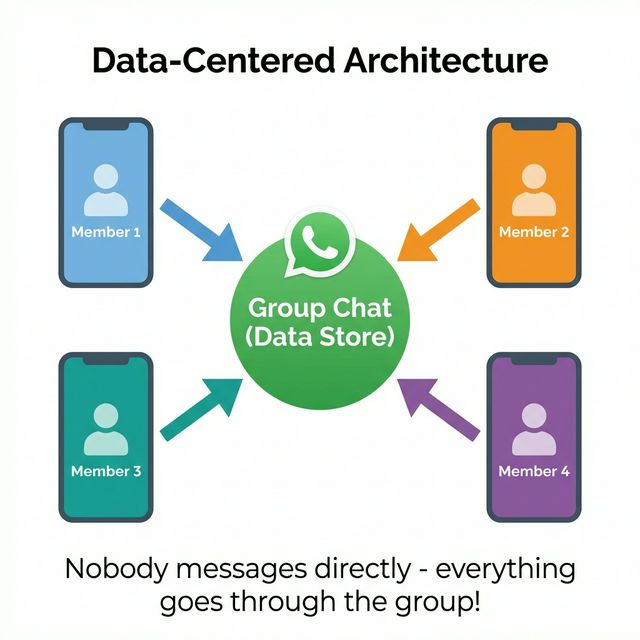
One central data store sits in the middle. All software components (called agents) connect to it. Agents never talk to each other directly โ everything goes through the data store.
Imagine your class WhatsApp group:
โ That's Data-Centered Architecture! One shared place, everyone accesses it.
The system has only 2 major parts:
The central hub โ stores all shared data. Provides: Insert, Delete, Update, and Retrieve operations.
Think: Database / Shared Folder / Cloud Drive
Software components that work independently. Each reads/writes data to the store without knowing about other agents.
Think: Apps / Modules / Services
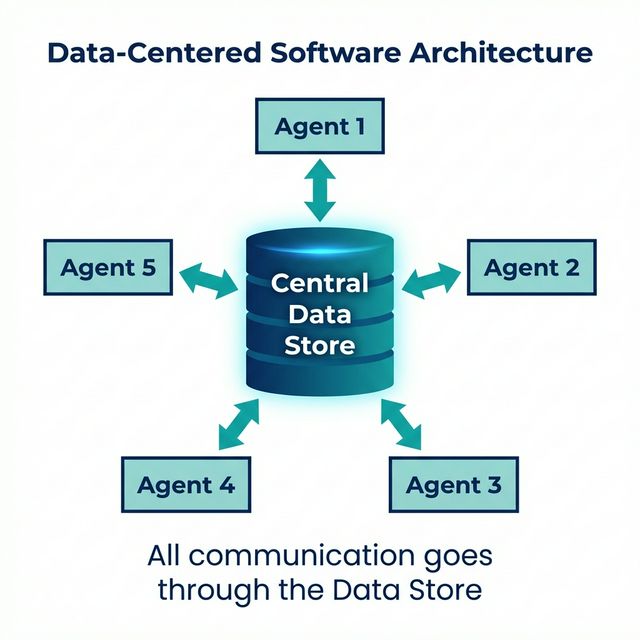
In pure data-centered architecture, Component A never calls Component B. All communication passes through the shared data store.
You upload a presentation to Google Drive.
Your friend opens Drive, sees the file, edits it.
Another friend opens Drive, sees updates, adds comments.
Nobody emailed the file โ everyone went to the shared drive (data store). That's data-centered!
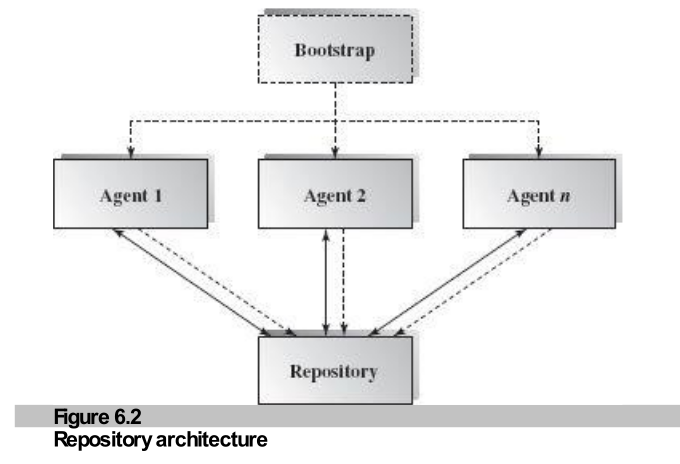
1. Data Link (Solid Lines โ)
Bidirectional โ agents get data from the store and put data into the store.
2. Control Link (Dashed Lines - -)
Bidirectional โ either the data store controls agents OR agents control the data store.
Who controls whom? That's what separates Repository from Blackboard!
Data-centered has 2 sub-types, separated by one question: "Who is the boss?"
Data Store = Passive (Lazy) ๐ด
Agents = Active (Hardworking) ๐ช
The agents decide when to read/write data. The data store just sits there waiting.
๐ช Like a Library: Books (data) sit quietly on shelves. You walk in, pick a book, return it. The library doesn't chase you!
Data Store = Active (Boss) ๐ซก
Agents = Passive (Waiting) โณ
The data store triggers events. When data changes, it notifies agents to wake up & act.
๐ข Like a Classroom: Teacher writes on the blackboard โ students react to what they see. The board drives the action!
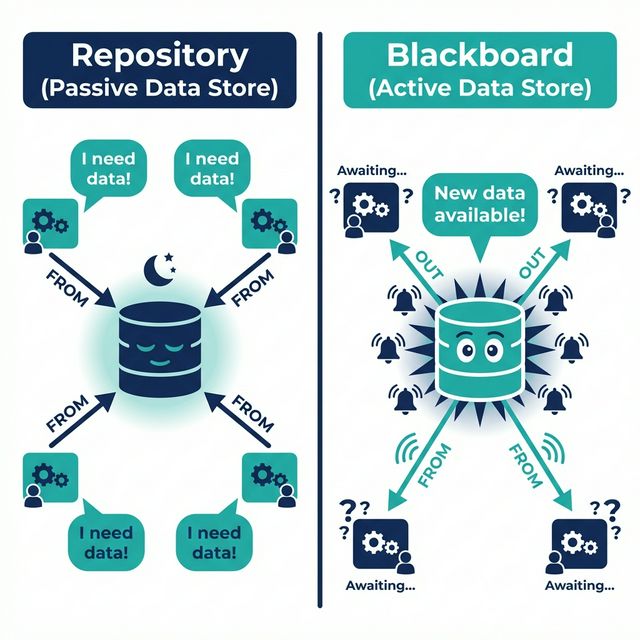
Agents (clients) actively request data from a passive data store. They can access it interactively (real-time queries) or via batch transactions (bulk operations). The data store never initiates contact.
Your project folder = Data Store (passive, just sits there with files)
The folder (data store) never says "Hey! Read me!" โ the tools (agents) pull from it when they need to.
MySQL, PostgreSQL โ Clients query, DB returns data.
Rational Rose, Visual Paradigm โ Tools share project models.
Lexer, Parser, Code Gen โ all share the symbol table.
The data store is active โ it triggers events when data changes. Agents (called Knowledge Sources / Subscribers) are passive โ they wait for notifications, then react. This chain continues until a goal is reached.
You post a photo on Instagram:
The server (data store) pushed the event, and agents reacted. Nobody asked โ the data triggered everything!
Knowledge-based expert systems โ data triggers reasoning.
Siri/Google โ audio data triggers processing agents.
Intrusion detected โ agents respond in chain.
Repository is a data-centered architecture that supports user interaction for data processing. The agents (clients) control computation and flow of logic โ NOT the data store. The data store is passive.
Netflix Database = Repository (passive, stores all movies/shows)
The database never says "Hey, watch this!" โ apps pull data when they need it. That's Repository!
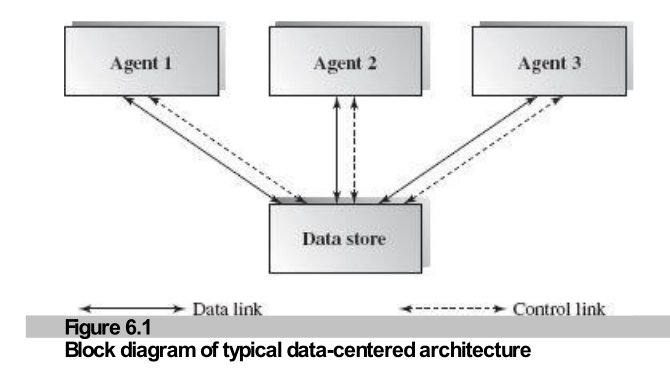
Figure 6.1: Repository Architecture
Multiple people typing in the same document.
User A types "Hello" โ Docs Engine saves to DB โ User B sees "Hello".
Figure 6.2: Control Flow (Agents control the Data Store)
A simple class diagram showing how Repository Architecture works in code
1. Student Class (Data Bean)
Holds one student's data: SSN + Name. Has getters & setters.
2. Students Collection
An ArrayList/Vector holding many Student objects. add(), remove(), next(), first().
3. Students Table (Database)
Physical DB table with rows: (SSN, Name). Connected via JDBC.
Think of your phone contacts:
When you add a new contact โ it goes into your list โ AND saves to the cloud database. That's exactly what this class diagram shows!
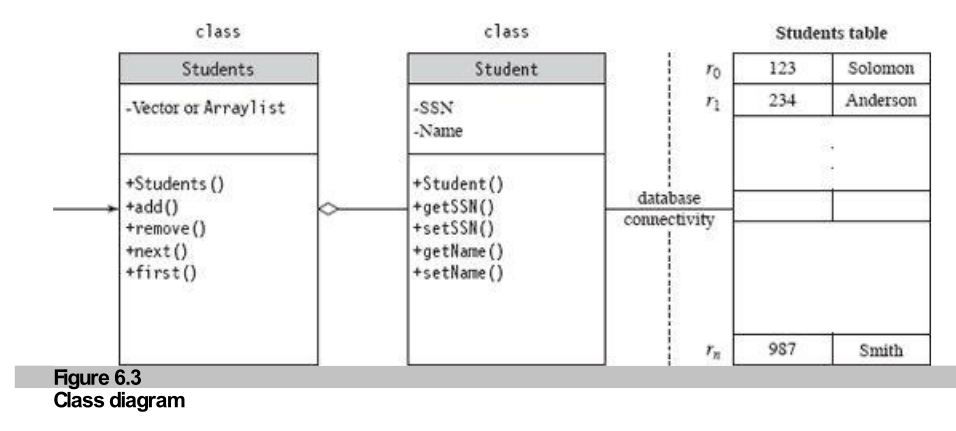
Figure 6.3: Student Management Class Diagram
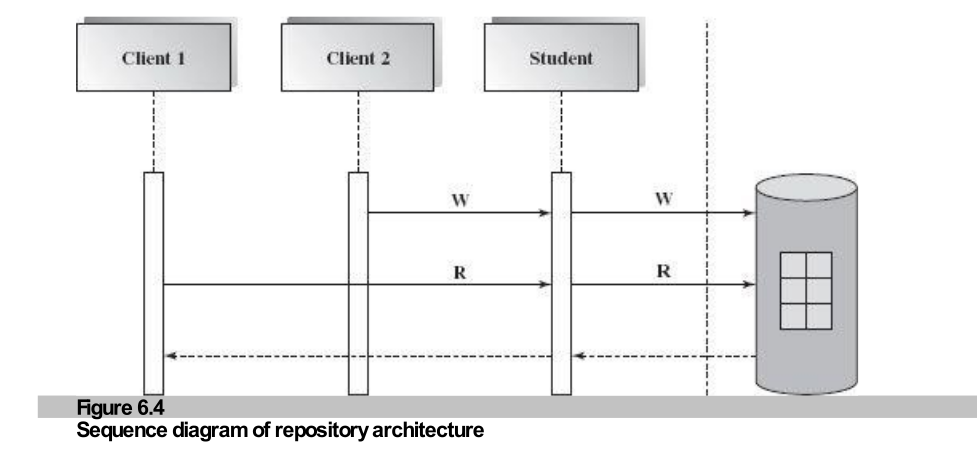
Figure 6.4: Dynamic View of Client Interaction
The Student class โ one object = one row in the database table
public class Student implements Serializable { String SSN; String Name; // Default Constructor public Student() { SSN = ""; Name = ""; } public Student(String ssn, String name) { SSN = ssn; Name = name; } // Getters & Setters public void setSSN(String ssn) { SSN = ssn; } public String getSSN() { return SSN; } public void setName(String name) { Name = name; } public String getName() { return Name; } }
Student class = Order Form at a restaurant
It has fields (dish name, quantity) and methods (fill in, read back). One form = one order = one DB row.
How agents (clients) connect to the Repository (database)
try { Class.forName("sun.jdbc.odbc.JdbcOdbcDriver"); Connection connection = DriverManager.getConnection( "jdbc:odbc:students"); } catch(Exception e) { ... }
ArrayList studentList = new ArrayList(); Statement stmt = connection.createStatement(); ResultSet results = stmt.executeQuery("SELECT * FROM students"); Student student = new Student(); while (results.next()) { student.setSsn(results.getString(1)); student.setName(results.getString(2)); studentList.add(student); }
1. Load Driver
JDBC driver = the "bridge" between Java and the DB
2. Get Connection
Open a "road" to the students database
3. Execute SQL
SELECT * = "Give me everything from students table"
4. Loop & Fill
Read each row โ create Student object โ add to list
Repository Pattern: Client (this code) actively pulls data from the passive DB. The DB never pushes data to the client!
Multiple clients can Read (R) and Write (W) the same data object. Each client may use a different interface: CLI, GUI, API, RPC, or RMI.
One Google Doc = shared data object
All 3 clients access the same document stored in Google's repository. They Read & Write independently!
| Interface | Example |
|---|---|
| CLI | MySQL Terminal |
| GUI | phpMyAdmin, DBeaver |
| Program API | JDBC, REST API |
| RPC / RMI | Remote method calls |
The relational DBMS is the most common repository architecture. The data store maintains schema (metadata), data tables, and index files. Many tools can access it.
Oracle Database = Repository (stores everything)
All these tools (agents) pull/push data to the same central database!
Schema (Metadata)
Table definitions, column types, constraints
Data Tables
Actual rows of data (students, courses, grades)
Index Files
Speed up searches (like a book's index)
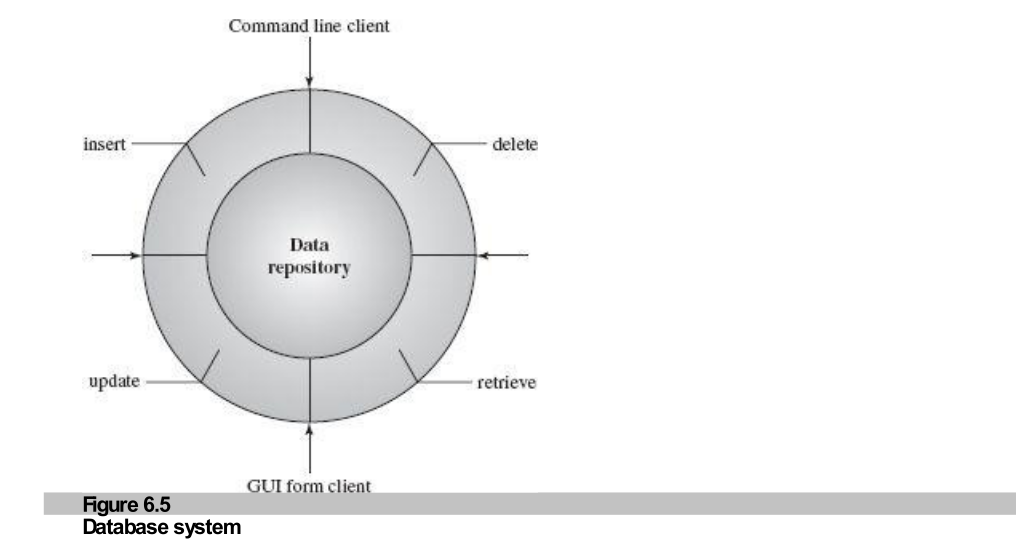
Figure 6.5: Database Management System
Computer Aided Software Engineering (CASE) systems are a perfect repository example. Multiple tools share one centralized data store containing design blueprints, code, and documentation.
๐ก Biggest Advantage: One centralized data set โ many tools โ different products for different purposes!
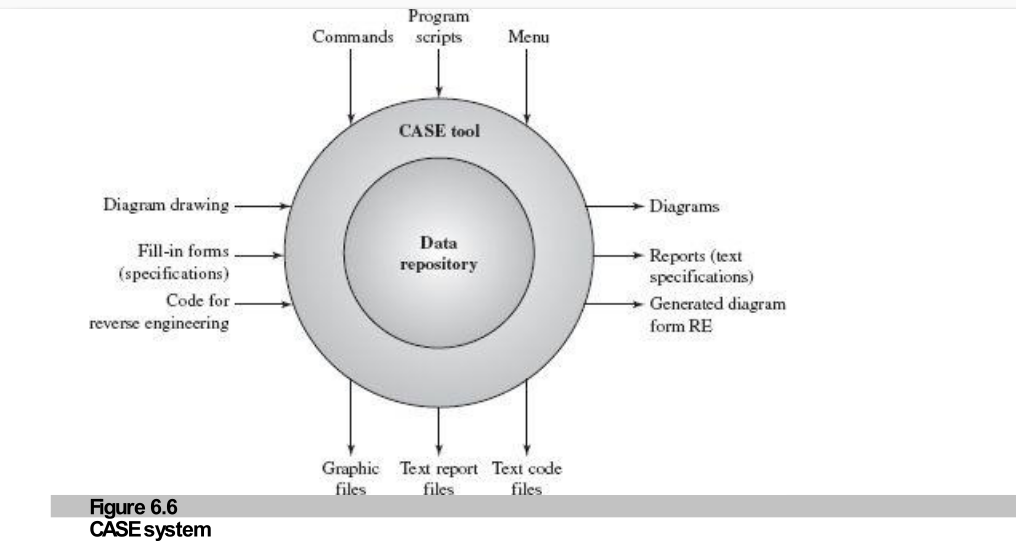
Figure 6.6: CASE Tools & Repository (Code, Designs, Docs)
Every compiler has a shared data repository (symbol table, syntax tree, constant table) accessed by all compilation phases. Data flows through phases but is stored centrally.
1. Scanner (Lexical Analyzer)
Reads source code โ breaks into tokens โ fills symbol table
2. Parser (Syntax Analyzer)
Reads symbol table โ builds syntax/parse tree
3. Semantics Analyzer
Checks type correctness on the syntax tree
4. Code Generator
Reads syntax tree โ produces target binary code
Your Java code = customer order
Everyone reads/writes on the same shared board (repository). Nobody passes notes directly!
Input: int x, y; x = y + 1;
Scanner tokenizes โ Parser builds tree โ Code Gen outputs: mov ax, [y]; add ax, 1; mov [x], ax
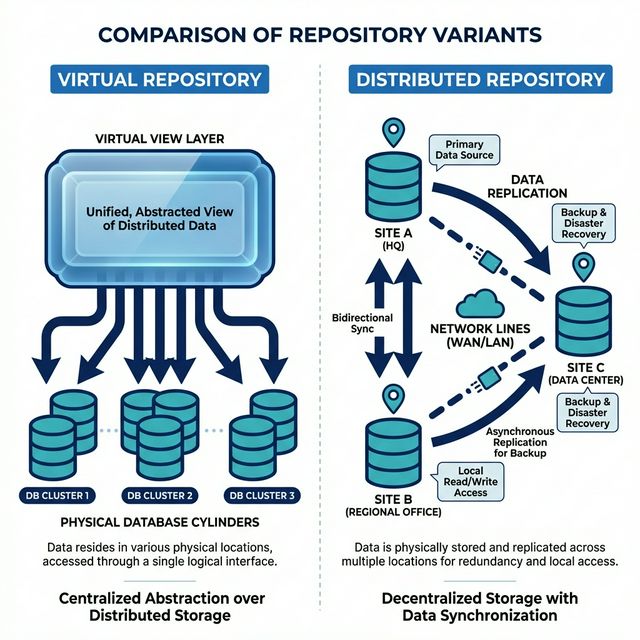
Two important variations of the standard repository
Built on top of multiple physical repositories. Uses database views to create virtual tables.
Benefits:
๐ฑ Example: University DB โ Students see "My Grades" view, Faculty sees "All Students" view, Admin sees everything. Same data, different views!
Data spread across multiple sites linked by network. Data is replicated for reliability.
Challenges:
๐ฆ Example: Bank with branches in Karachi, Lahore, Islamabad โ each branch has local DB, all synced together!
๐ Data Integrity
Easy to backup & restore โ all data in one place
๐ Scalability
Easy to add new agents โ they don't communicate with each other
โก Less Overhead
No transient data passing between components directly
๐ฅ Single Point of Failure
If the centralized DB goes down โ everything stops
๐ High Dependency
Data structure changes โ all agents must be updated!
๐ธ Network Cost
If distributed โ moving data across network is expensive
Large, complex info systems where many agents need data access. Requires data transactions to drive control flow.
Layered, Multi-tier, and MVC architectures often incorporate repository patterns inside them.
Blackboard systems are designed for problems where there is no single correct algorithm to find the answer (e.g., Speech Recognition, AI). Instead, many experts collaborate to build a partial solution.
Imagine a difficult math problem on a Blackboard.
1. Teacher writes the problem.
2. Student A writes a partial formula.
3. Student B sees it, gets an idea, and adds a calculation.
4. Student C sees that, and solves the final step.
They worked independently and opportunistically (when they saw something they understood).
Key Concept: The solution is built incrementally. No single agent knows how to solve the whole problem!
The specialized components that make Blackboard work
Data Store
Specialist Agents
Supervisor
The Blackboard is Passive (mostly) โ The Agents are Active but triggered by data changes.
Solid Lines = Data Flow (Read/Write)
Dashed Lines = Control Flow (Triggering)
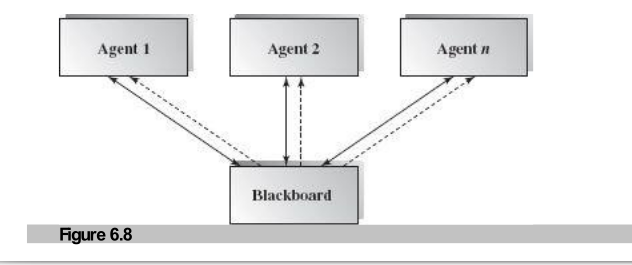
Figure 6.8: Blackboard Architecture Block Diagram
How do agents know when to work? They don't talk to each other. They use Implicit Invocation via the Blackboard.
The mechanism for collaboration:
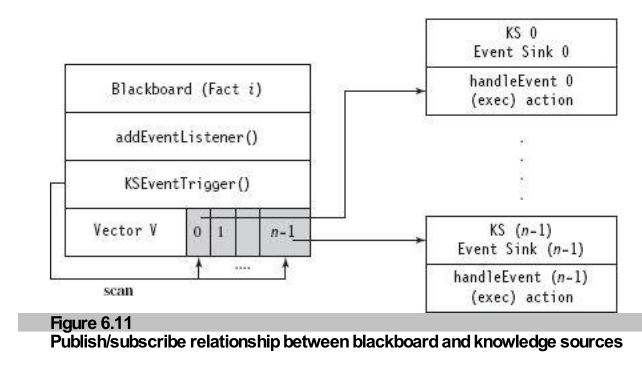
Figure 6.11: Publish/Subscribe Relationship
Using Forward Reasoning to identify an animal
1. Scan: F1 "eats meat" matches R2.
โ Add "Carnivore" to Blackboard.
2. Scan: F2 "gives milk" matches R1.
โ Add "Mammal" to Blackboard.
3. Scan: Now we have Mammal + Carnivore + F3 + F4.
โ Matches R3.
๐ฏ Conclusion: It's a TIGER!
The structural view showing the 1-to-many relationship between Blackboard and Knowledge Sources.
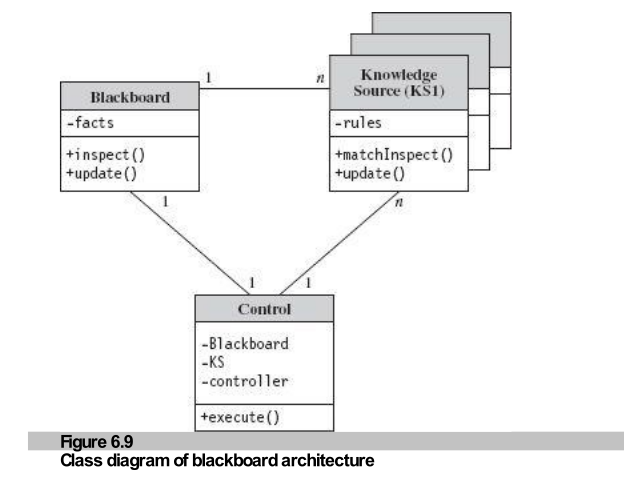
Figure 6.9: Blackboard Class Diagram
The lifecycle of a Blackboard system: Initiate โ Loop (Inspect โ Match โ Update) โ Terminate.
1. Initiation: Controller starts BB and KS.
2. Event Trigger: Initial data placed on BB.
3. Match: KS inspects BB.
4. Execute: KS runs its logic.
5. Update: KS writes new result to BB.
6. Repeat until solution found.
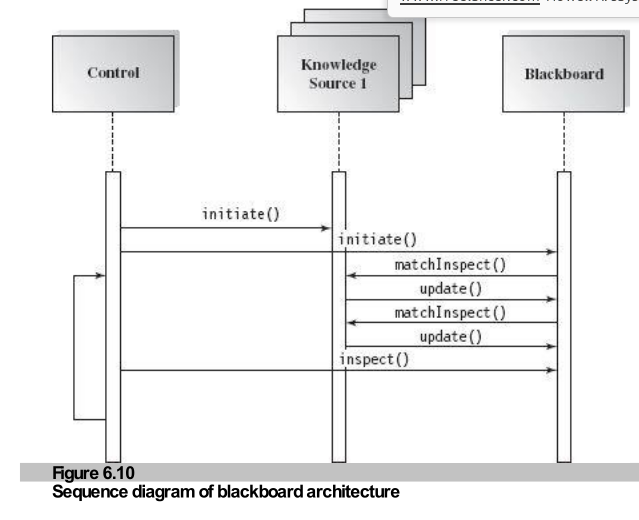
Figure 6.10: Sequence Diagram
Figure 6.12 illustrates a blackboard for travel planning
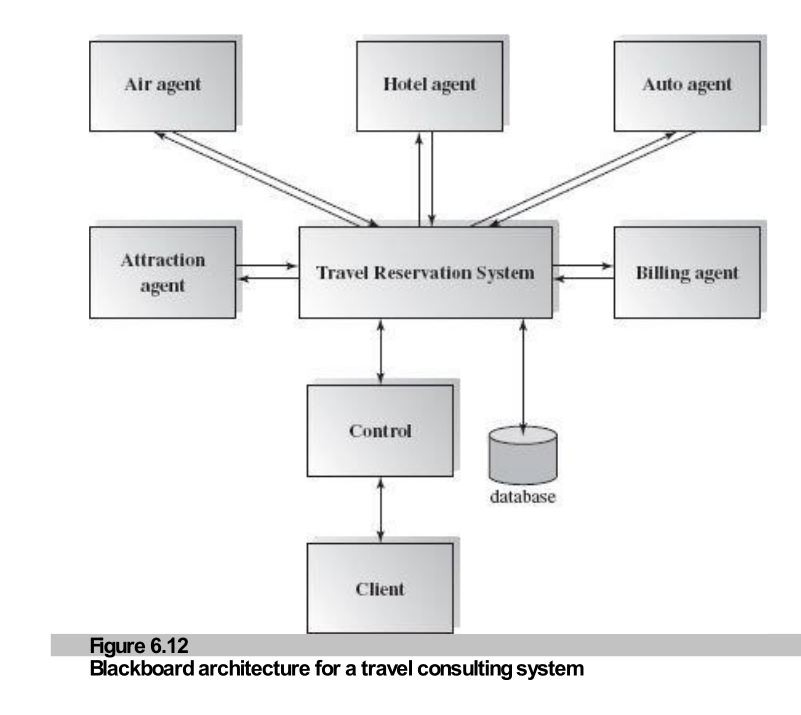
Figure 6.12: Smart Travel Agent Problem
1. Controller posts request to Blackboard.
2. Air Agent sees "Paris" โ searches flights โ writes "Flight $800".
3. Budget updates on Blackboard: "$2200 remaining".
4. Hotel Agent sees "$2200 left" + "Paris" โ searches hotels โ writes "Hotel $1000".
5. Billing Agent waits for final "OK" to charge card.
Advantage: The Hotel Agent didn't need to ask the Air Agent directly. The Blackboard mediated the budget constraints automatically!

Best for Open-Ended, Complex, and Ill-Defined problems where no deterministic solution exists (you can't just write a simple "if/else" program).
Because these problems involve Partial Knowledge.
Example: In speech, "I scream" and "Ice cream" sound the same. You need context (Sentence Expert) and Grammar (Syntax Expert) to act as separate agents to figure out the truth!
๐งฉ Scalability
Easy to add new experts (KS) without changing others.
โก Concurrency
Experts can work in parallel on different parts of the problem.
๐งช Experimentation
Supports multiple hypotheses (trying different paths).
๐ธ๏ธ Structural Dependency
If Blackboard format changes, ALL agents break.
๐ Termination?
Hard to decide when to stop (Is the answer "good enough"?).
๐ Difficult Debugging
With many agents firing randomly, it's hard to trace logic.
Who is driving the bus? The User/Script or the Data?
User โ Logic โ Data
The logic flow is determined by the Client Agents. The database is just a tool they use.
Data Change โ Logic โ Data Change
The logic flow is determined by the Current State of Data. The Blackboard tells agents what to do.
Explicit vs Implicit Invocation
// Agent explicitly calls DB
db.query("SELECT * FROM users");
The agent knows exactly what it wants and when it wants it.
// Agent subscribes to event
blackboard.on("NEW_DATA", runAnalysis);
The agent waits for a signal. It doesn't know when it will be called.
You (Agent) walk in. The milk (Data) sits there. You grab it when you need it. The milk doesn't jump in your cart.
Patient (Data) status changes (Heart rate drops!). Monitor beeps (Event). Doctor (Expert Agent) rushes in immediately.
Blackboard is the "Brain" architecture.
Because in these fields, we don't know the query!
We don't say "SELECT * FROM sounds WHERE word='hello'".
We say "Here is a sound wave. Does anyone recognize it?"
Data centered repository architecture may be one of the most popular software architectures since most software applications require a data repository. Repositories are often used in layered architecture, client-server architecture, data tier in multi-tier architecture, and many other designs.
Agents of the data store in repository architecture control the logic flow. The data store is passive, and agents trigger operations.
Blackboard architecture is a knowledge-based architecture where the status of the data controls and triggers operations. The data store is active. The connection is implicit (instead of explicit invocation).
Common in: Pattern recognition, speech recognition, and expert systems.
1. Which is NOT a benefit of repository architecture?
a. Independent agents b. Reusable agents c. Concurrency d.
Loose
coupling
2. Which is a typical domain of blackboard architecture?
a. AI system b. Business Info System c. Compilers d. Virtual
machine
3. The Yellow Page of web service is an example of repository design.
a. True b. False
4. Implicit notification is often used in blackboard architecture.
a. True b. False
5. Repository architecture design must also be object-oriented design.
a. True b. False
6. Agents in repository architecture normally do not talk with each other directly, except
through
the data store.
a. True b. False
7. Loose coupling is used between repository agents.
a. True b. False
8. There is tight dependency of agents on the data store in the repository
architecture.
a. True b. False
9. Rule-based knowledge is installed in the blackboard component of the blackboard
architecture.
a. True b. False
10. The facts or hypotheses are stored in the knowledge source component of a blackboard
system.
a. True b. False
1. c (Concurrency)
2. a (AI System)
3. a (True)
4. a (True)
5. b (False)
6. a (True)
7. a (True)
8. a (True)
9. b (False - in Knowledge Source)
10. b (False - in Blackboard)
| Feature | Repository | Blackboard |
|---|---|---|
| Control Flow | Agents (User Logic) | Data State (Triggers) |
| Data Store | Passive (Wait for query) | Active (Notify agents) |
| Connection | Explicit Invocation (Call) | Implicit Invocation (Pub/Sub) |
| Best For | DBMS, Business Apps, CASE | AI, Speech/Pattern Recognition |
| Data Stability | Stable (defined schema) | Evolving (hypotheses) |